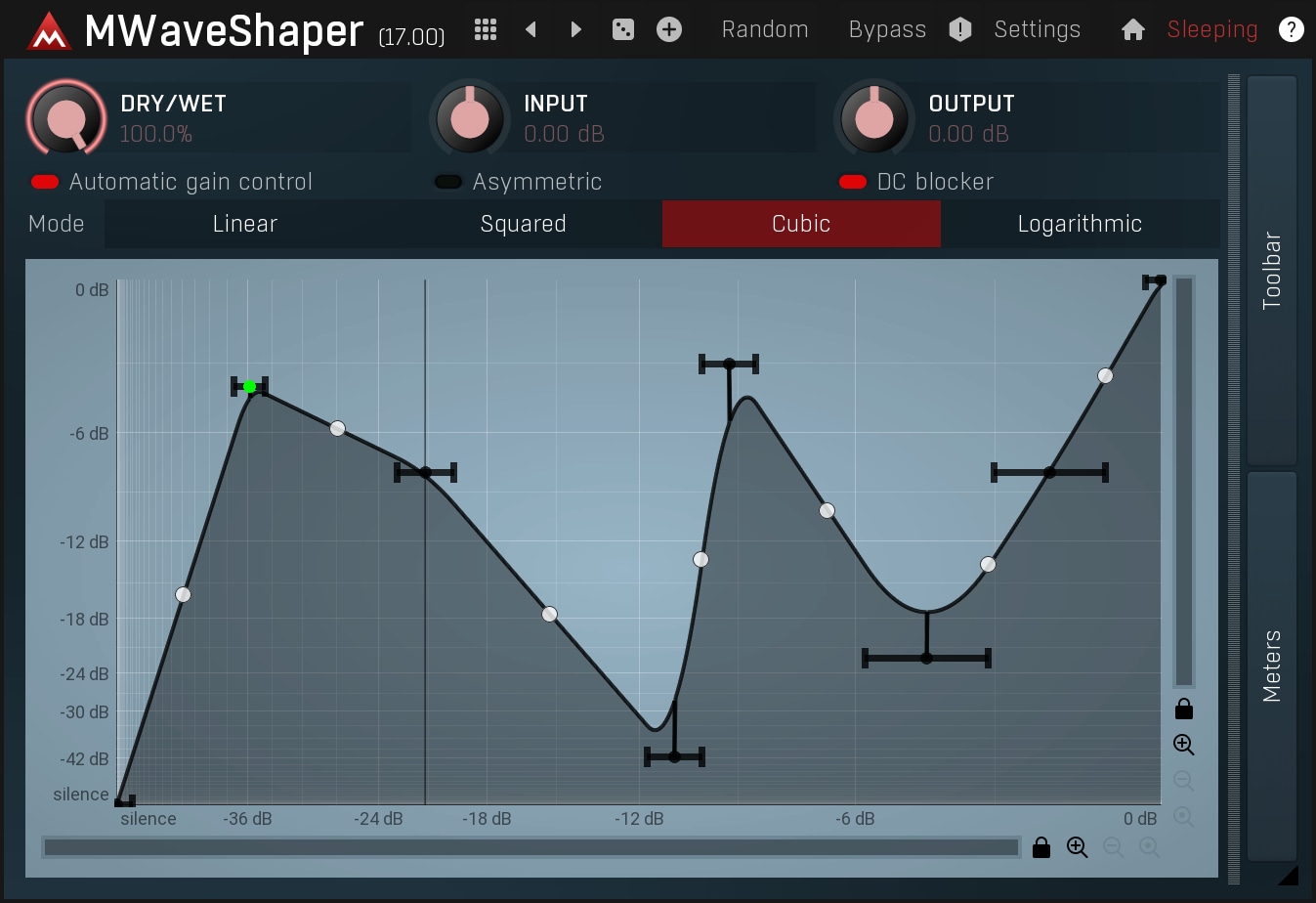
MWaveShaper is a waveshaping effect for building your own transfer curve. The graph maps the incoming signal on its X axis to the output on its Y axis, giving you direct control over how the waveform changes. It suits producers who want to shape a specific harmonic response instead of choosing from fixed distortion patterns.
Shape the transfer curve
Add and move points, adjust curve curvature and smoothing, or draw a shape freehand. You can also build a curve from the step sequencer or analyze a section of an audio file to extract its level envelope. The Dry/Wet control blends the processed signal with the original.
Control harmonics and aliasing
Symmetric shaping can produce odd harmonics. Asymmetric shaping can also produce even harmonics, which can help simulate analog-device behavior. An integrated DC blocker can remove signal offset caused by asymmetric shaping.
Adjustable oversampling runs from 1x to 1024x and uses minimum-phase or high-quality linear-phase algorithms to reduce aliasing from nonlinear processing. Higher oversampling can use more CPU and add latency, so choose a setting by listening to the result in your project.
Compare settings and manage output
Store up to eight settings in slots A through H and switch between them for comparison. The X/Y morph control blends the first four slots. Morphing affects automatable or modulatable parameters and changes the selected slot, so use a spare slot if you want to keep the source settings intact.
Automatic gain control can match output loudness to input while you compare settings. It takes time to settle and, because it is a nonlinear process, can add distortion. The optional safety limiter catches peaks above 0 dB, but it changes the output signal and uses additional processing.
Channel processing
MWaveShaper supports mono and stereo, separate left or right processing, and mid/side modes. It can also process up to eight surround channels or up to 64 ambisonic channels. Surround and ambisonic use depends on host support and setup; VST2 surround requires a global activation setting, and ambisonics must be enabled in the DAW.
Compatibility and licensing
MeldaProduction lists MWaveShaper as a free effect and includes it in MFreeFXBundle. Its 64-bit Windows versions support VST, VST3 and AAX hosts on Windows 10 or 11, with an Intel or AMD processor that supports SSE2. On macOS 10.14 or newer, it supports VST, VST3, AU and AAX hosts on 64-bit Intel, AMD or Apple Silicon systems. Linux is not directly supported; MeldaProduction notes that running the plugins through Wine may be possible.
MeldaProduction describes its licenses as personal: the license holder may use the software on their own computers, but only they may operate it. Activation uses a license file and does not require a dongle or internet access.