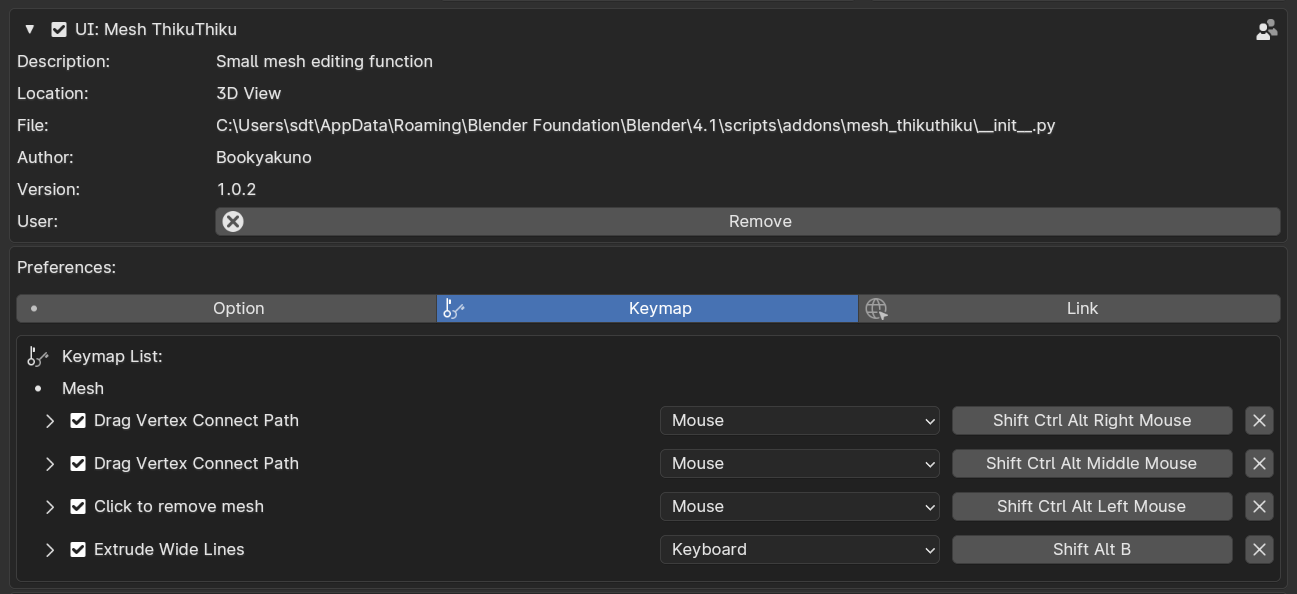
Mesh Thikuthiku is a Blender add-on by Bookyakuno for mesh edits: modifier-key mouse gestures connect or merge vertices and remove mesh or edges, while Alt + Shift + B creates extrusion lines from selected edges.
Connect and merge vertices, remove mesh or edges
Each mouse action maps to a different mesh edit:
- Remove mesh or edges with Ctrl + Shift + Alt + left mouse click.
- Remove loop edges by dragging with the same modifiers and the left mouse button.
- Connect vertices with Ctrl + Shift + Alt + middle mouse drag.
- Merge vertices with Ctrl + Shift + Alt + Merge Mouse Drag.
Options for edge removal and connection
The Loop edge option sets a loop edge as the removal target. Target only edges is enabled by default; the listing says an invalid target falls back to vertices or edges. Edge merge mode switches the connection action to vertex merging. These controls let you choose what the removal gesture targets and whether a drag connects or merges geometry.
Create extrusion lines from selected edges
Extrude Wide Lines uses selected edges as the basis for an extrusion line. Run it with Alt + Shift + B. The tool lets you fine-tune bevel and extrusion operations together when creating lines. This operation starts from selected edges, unlike the vertex connection and edge removal gestures.
Who may find it useful
Mesh Thikuthiku may suit Blender users who regularly connect or merge vertices, remove edges, or build lines from selected edges.
Superhive's product listing identifies Bookyakuno as the creator and lists the add-on under the GPL license.