What it does
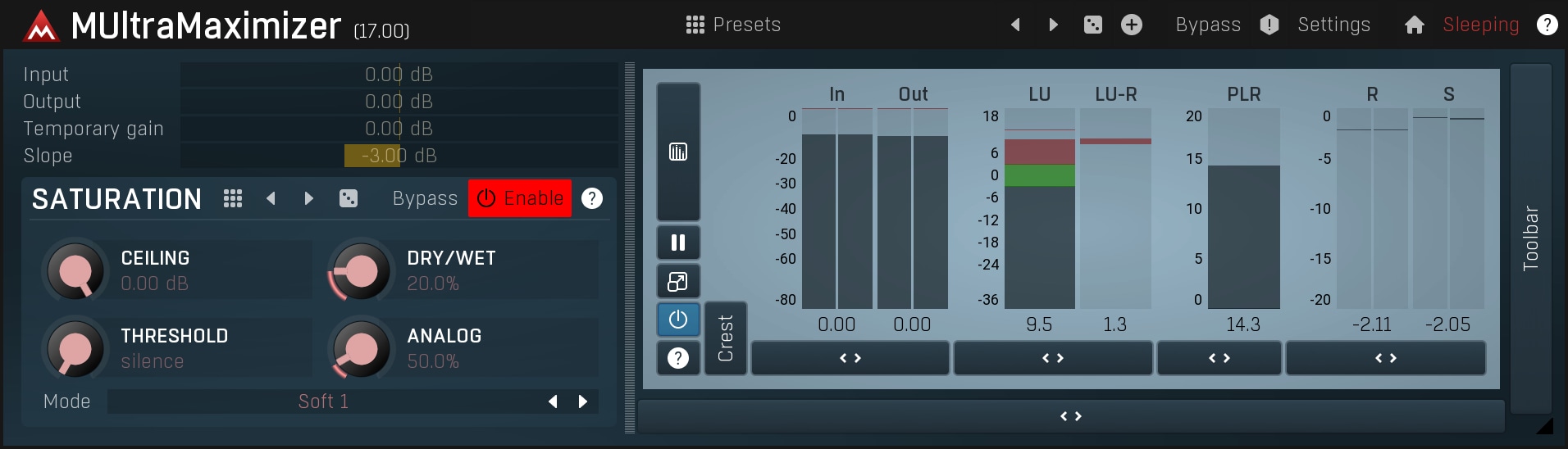
MUltraMaximizer is a multiband brickwall limiter for mastering. Its Input Gain drives the limiting process: raising it increases loudness while progressively reducing dynamics, and pushing it too far can cause distortion. Output Gain sets the level after the bands are summed and before saturation, so it affects both level and saturation. Slope changes the balance between band thresholds; negative settings add more bass energy.
The output saturator can add even harmonics, but stronger saturation can produce audible distortion. The manual says that disabling saturation also removes the 0 dB output limit, leaving room for an external single-band limiter afterward. This suits mastering work where you want to adjust loudness, tonal balance, and saturation in one plugin and are willing to monitor the tradeoff with dynamics. The feature list and product manual describe the controls.
A mastering workflow
Play a representative section and raise Input Gain gradually. Watch the band meters to see where gain reduction is occurring, then adjust Output Gain and Slope while checking the output and saturation meters. Back off if the result loses more dynamics or gains more distortion than you want.
Automatic gain compensation (AGC) helps compare settings at similar loudness, so a louder change is less likely to seem better simply because it is louder. AGC measures over a 400 ms window, so allow it to settle after changing controls. The Set control can analyze playback and adjust Output Gain to bring the output closer to the input level.
Use the A-H slots to keep up to eight settings in one instance. A/B switches between the two most recently selected slots, while the X-Y pad morphs among A-D. The X-Y pad writes its result into the currently selected slot, so select an E-H slot before morphing to preserve the A-D settings. The morph gesture itself cannot be automated, though most plugin parameters can be automated or modulated.
Formats and compatibility
- Windows 10 or 11, 64-bit: VST, VST3, or AAX host, with an Intel or AMD processor that supports SSE2.
- macOS 10.14 Mojave or newer, 64-bit: VST, VST3, AU, or AAX host. Melda lists Intel, AMD, and Apple Silicon processors.
- Channel modes include mono, stereo, mid/side, up to 8-channel surround, and up to 64-channel ambisonics. Ambisonics requires a compatible host and global activation; VST2 surround also requires activation. Melda notes that DAW support for ambisonics is still uncommon.
- Linux is not directly supported. Melda says it may run through Wine if the Wine Windows Fonts folder contains Microsoft TrueType fonts.
Melda recommends using the trial period to check operation on systems below its listed requirements. See the MUltraMaximizer support page and system requirements for the current compatibility details.