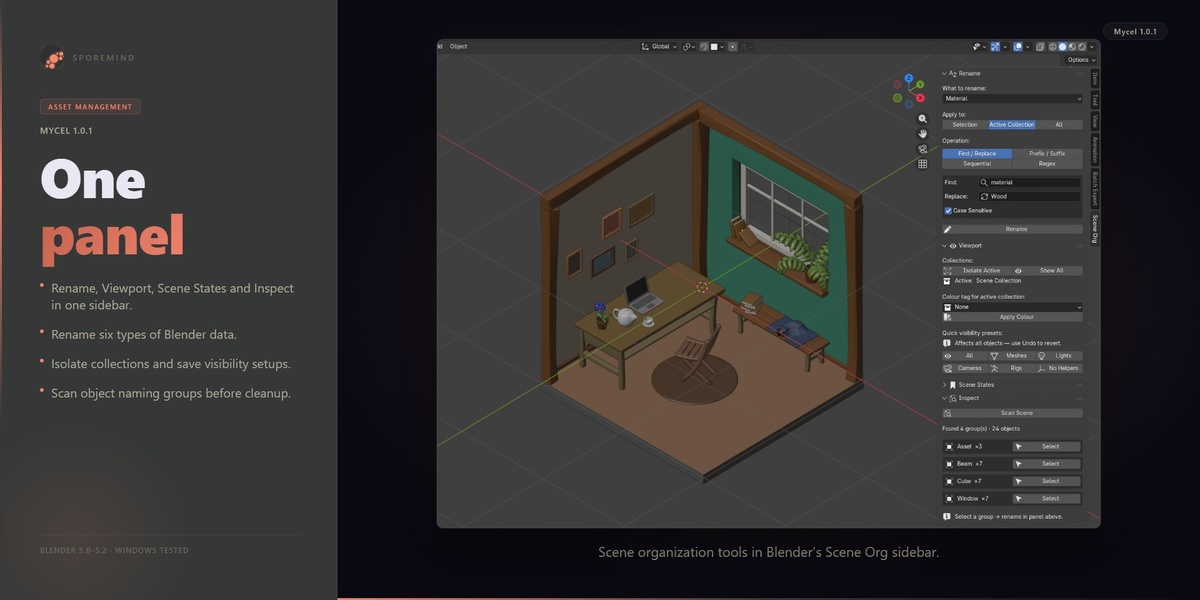
Mycel is Sporemind’s Blender add-on for batch renaming and scene organization. Version 1.1.0 requires Blender 5.0 or later. The manual lists Windows tests with Blender 5.0.1 and 5.2.2 LTS; other operating systems and versions are unverified. Mycel changes names and visibility in the current project. It does not edit geometry or save the project for you. See the Mycel 1.1.0 manual and product listing for details.
Review batch renames before applying
Mycel can rename objects, meshes, materials, modifiers, collections, or bones. Choose Selection, Active Collection, or All, then use Find/Replace, Prefix/Suffix, Sequential, or Regex. Sequential naming processes objects in alphabetical name order.
Preview Rename shows current and final names, reports conflicts and truncations, and counts linked or read-only items it skips. You can inspect the rows before applying the changes. Cancel leaves names unchanged; Apply makes the batch one Undo step, which can also be redone. If the selection, settings, target names, or relevant names change while the preview is open, Mycel cancels confirmation so you can preview again.
Shared meshes, materials, and armatures are processed once. Renaming one changes its name for every object that uses it, including objects outside the selected scope. Linked and read-only items are skipped. Local overrides follow Blender’s editability rules.
Manage collection visibility
Collection color tags update in the Outliner. Quick Isolate keeps the active collection, its ancestors, and its descendants visible while hiding other branches. Existing collection exclusions and object hiding remain in effect. Show All clears layer-collection viewport hiding; it does not recreate the previous layout.
Scene States save named visibility snapshots in the .blend file when you save the project. They capture object visibility and active-view-layer collection hiding or exclusion, but not geometry or camera views. Because states refer to data names, re-save them after renaming or deleting objects or collections.
Group object names for cleanup
Scan Scene groups object names after removing a trailing numeric suffix, then lets you select a group and prepare sequential naming. It does not compare geometry or inspect mesh and material names. Renaming requires Object Mode.
When Mycel may fit
The add-on suits scene cleanup and asset preparation where consistent names and reusable visibility layouts matter. The product listing describes uses such as preparing assets for Unity or Unreal, managing lighting variants, and cleaning up imported scenes. Save the project before a large cleanup, as the manual recommends.