Node Preview Switcher is a Blender extension by INSDesign for previewing shader node changes while editing a material. Change a node parameter to route its output to the material output; after the delay you choose, the original material connections return and your parameter edits remain. The current Superhive listing identifies version 1.3.0 and Blender 5.2 as its minimum version.
Choose what to preview
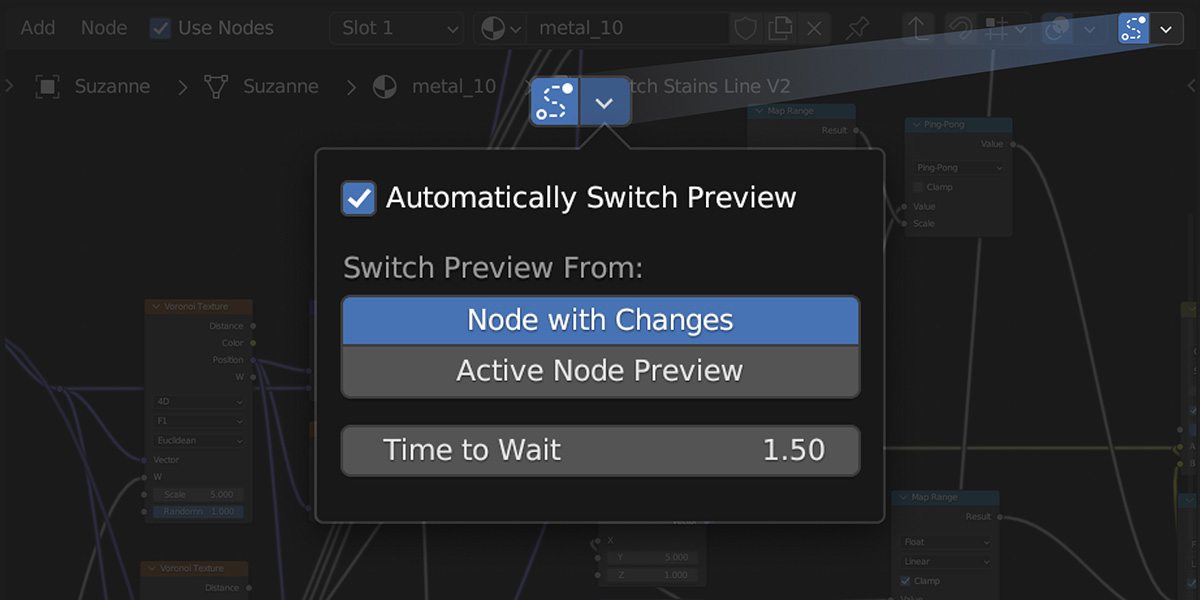
Automatic preview has two modes: Node with Changes previews the node whose parameter you edited, while Active Node Preview previews the currently active node. Set the wait time in the settings popover beside the tracking control in the Shader Editor header. Selecting or moving a node does not trigger an automatic preview.
For manual control, open the Shader Editor sidebar with N, then use Switch and Restore State in the Node Switcher panel. The extension handles one preview session at a time.
Supported materials and render engines
Node Preview Switcher supports material shaders, including nodes inside nested material groups. It works with Cycles and Eevee, using the appropriate material output for each engine. View the result with Material Preview or Rendered viewport shading. World, compositor and geometry node previews are outside its documented scope.
Install version 1.3.0
Version 1.3.0 is packaged as a Blender Extension and requires Blender 5.2 or later; the developer says it was tested with Blender 5.2.2 LTS. If an older Node Preview Switcher copy is enabled, disable it under Edit > Preferences > Add-ons first. Install the downloaded ZIP without extracting it: drag it into Blender and confirm, or choose Preferences > Get Extensions > Install from Disk and select the ZIP; then enable the extension. The installation and usage documentation covers the setup and controls. The listing identifies the extension's license as GPL.