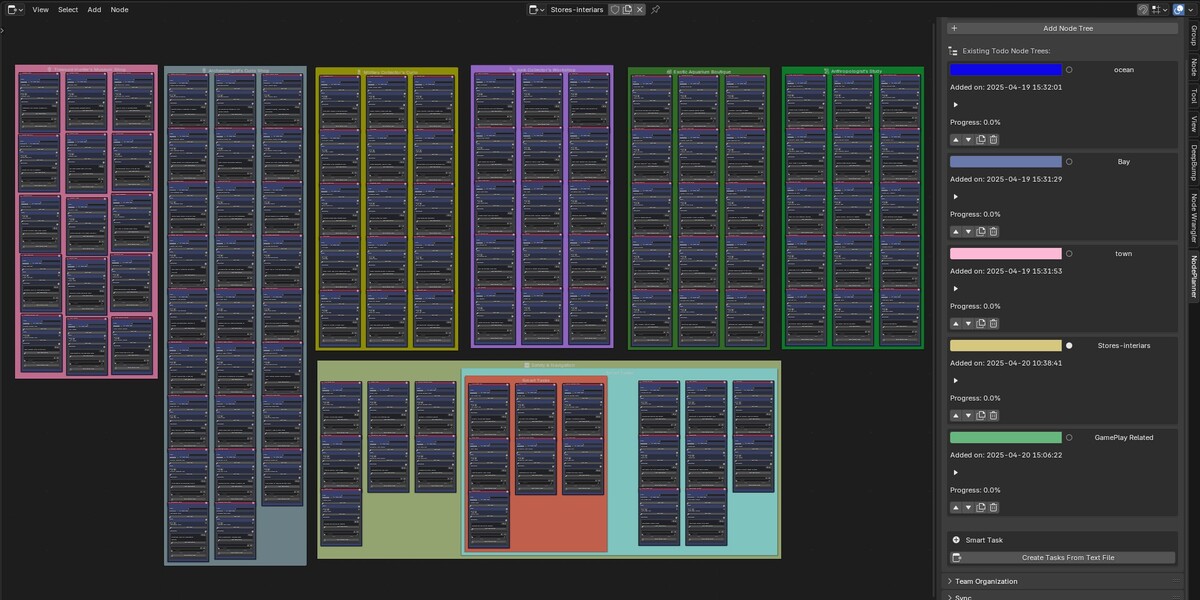
NodePlanner, by DevBud Games, adds project task management to Blender through a custom node editor. Create task boards as node trees, track work with checkboxes, and link tasks to objects or collections in your scene. Separate boards can help organize phases such as modeling, animation, and lighting.
Organize work in node-based task boards
Name and color each node tree so you can tell project boards apart. A Task Node holds checklist items, and its completion percentage updates as you check them off. The NodePlanner Panel shows progress for each board, so you can switch between phases and see what remains.
Tasks can be plain text, references to Blender objects, or references to collections. Object and collection references keep an action connected to the scene element it concerns, such as a model that needs review or a collection that needs setup.
Keep notes and optional team sync together
Use Note Nodes for reminders, comments, or instructions. Notes have read and unread states, and collaborators can contribute to the same note in shared workflows.
Sync is optional. NodePlanner can push and pull node tree updates through a GitHub repository after you enter a GitHub token and a user name your team recognizes in the add-on preferences, or through a shared local folder that a cloud storage app such as Google Drive, OneDrive, or Dropbox syncs between machines. See the Superhive product page for current setup details.
Start a board in Blender
- In Blender, go to Edit > Preferences > Add-ons > Install, then enable NodePlanner.
- Open a new editor window and choose NodePlanner Editor from the editor type menu.
- In the NodePlanner Panel, select Add Node Tree, then name and color the board.
- Add Task Nodes for work items and Note Nodes for project messages.
The Superhive listing names Blender versions 3.4, 3.5, 3.6, 4.0, 4.1, 4.2, 4.3, and 4.4. Check the current listing for compatibility before installing.
Who it may suit
NodePlanner may suit Blender artists who want to track production tasks alongside the scene, and small teams that share project notes or board updates across machines. It can organize work around a storyboard or animation project, using task boards, scene references, notes, and progress tracking.
AnyPlugins listed NodePlanner as free in July 2026. Search results checked on November 26, 2026 showed $10.99 on DevBud's Gumroad page and $9.99 on Superhive. Confirm the seller's current price and commercial terms before buying; Superhive labels its license Royalty Free.