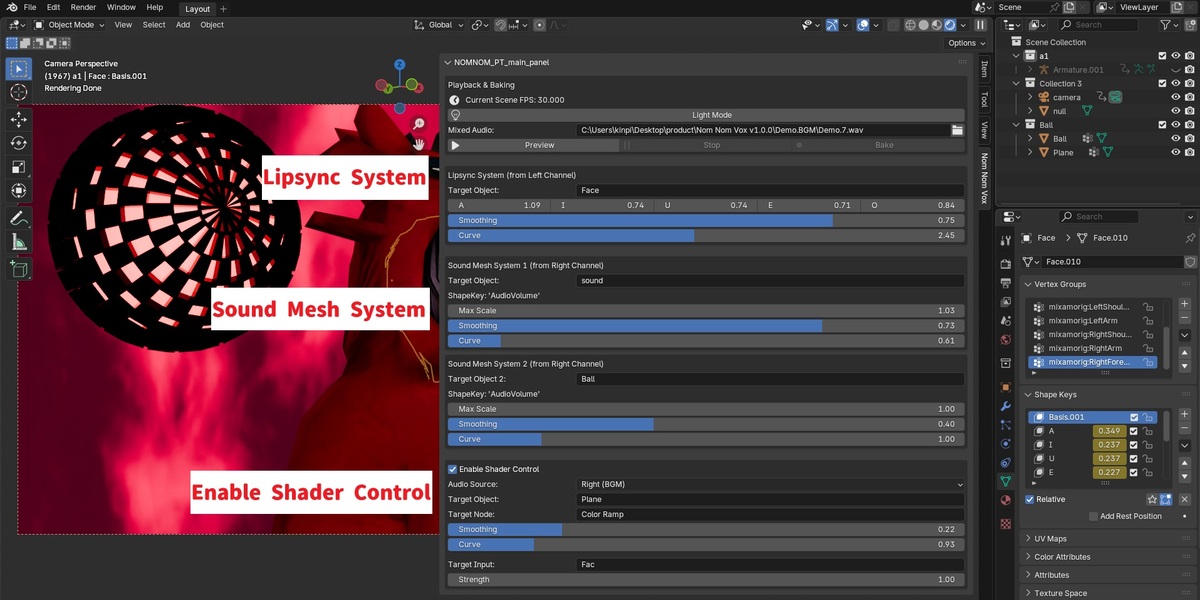
Nom Nom Vox is a Blender add-on by pikopiko that uses stereo audio to drive character lipsync and sound-reactive animation. The left channel carries vocals for mouth movement; the right carries background music for mesh effects or shader controls. It supports Blender 4.2 and later, with versions 4.2 through 4.5 listed as tested.
Prepare a stereo audio file
Put the vocal track on the left channel and background music on the right, then export a mixed stereo WAV. If the tracks are separate, the manual describes panning them in an editor such as Audacity before export. It lists 44.1 or 48 kHz audio, with 48 kHz preferred.
Set up the character and animation targets
For lipsync, the character needs A, I, U, E, and O shape keys. The default target object is named Face, and the name can be changed. Sound-reactive mesh animation is optional: the manual describes an AudioVolume shape key and support for up to two target objects. Shader control can use either audio channel to drive a selected object's node and socket.
Nom Nom Vox can preview the result or bake animation into keyframes. Baking processes the audio at the current frame rate and adds an audio strip to Blender's Video Sequence Editor. The manual recommends Audio Sync playback for timing. If movement looks jittery, adjust the Smoothing control before baking or simplify the resulting F-curves in the Graph Editor. Light Mode reduces viewport work during preview and baking, then restores the previous settings.
Requirements and installation
The documented operating systems are Windows 10 and 11 (64-bit). macOS and Linux builds are planned, so they are not listed as currently available. The product listing names Cycles and Eevee as render engines used.
There are two feature-identical packages. Install the standard add-on package through Preferences, Add-ons, and Install, or use the Extensions package through Preferences, Get Extensions, and Install. Choose one package rather than installing both. See the Nom Nom Vox manual for setup steps and the product FAQ for troubleshooting. The demo and tutorial video shows the add-on in use.
License and created work
The product listing identifies the add-on as GPL. Its manual specifies GPL v3 or later for the add-on script and separate restrictions for included assets, which may not be resold or redistributed. The manual says work created with the add-on, such as videos and images, belongs to the user and may be used commercially. Check the manual for the terms that apply to each included component.