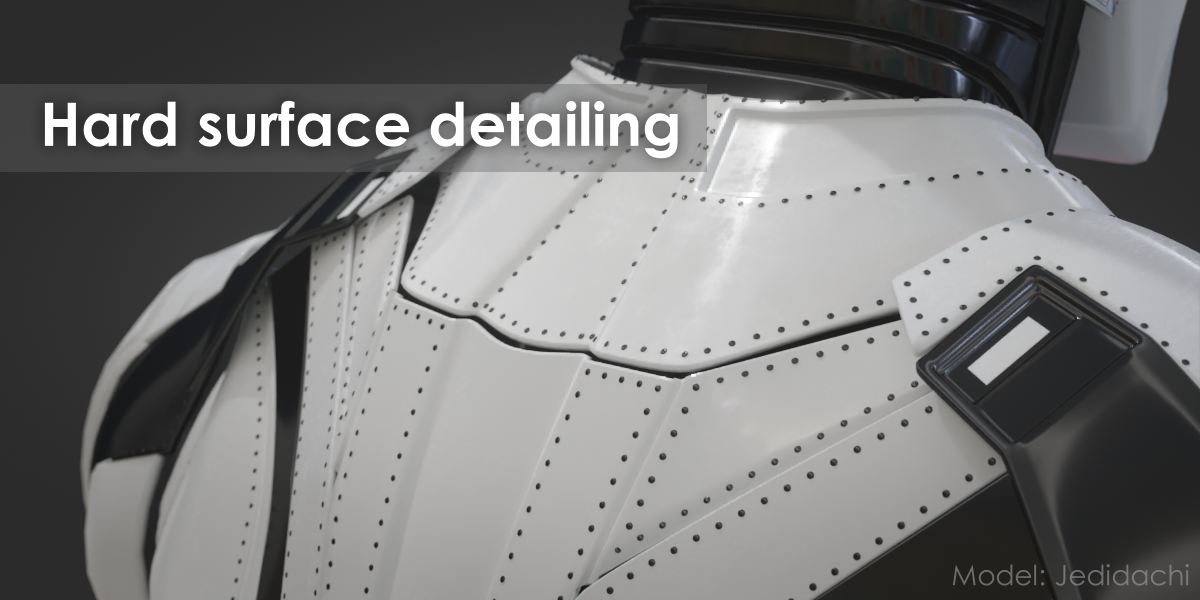
Panel Stitcher is a Blender add-on for placing rivet, screw, and stitching patterns along mesh edges. It generates actual geometry from a chosen element object, collection, or built-in template. You can keep the generated details as geometry or bake them into PBR maps; the Project option places them from one object onto another surface.
Choose elements and control placement
The included presets cover rivets, screws, and stitch styles. You can also use your own element object or choose instances from a collection. Panel Stitcher places these elements along a mesh’s edges, with settings for scale, spacing, offset, corners, and orientation.
- Filter placement by edge angle, face area, sharp marks, seams, or viewport selection.
- Mark edges by hand in Edit Mode when you want direct control over placement.
- Mix edge insetting with random placement or rotation for varied patterns.
- Choose whether elements appear on edges, corners, or corners only.
Project patterns onto high-resolution surfaces
The Project option places elements along the edges of one object, then projects them onto a different target object. This can help when you use a simpler mesh to define a pattern that needs to sit on a sculpt or another high-resolution surface. Version 3.0 updates the algorithm for high curvature and adds automatic beveling to round off sharp corners.
Keep the geometry or bake it into maps
For a game asset or another model where runtime geometry is a concern, you can bake the generated details into PBR maps. Witting Graphics’ documentation includes a baking tutorial. Its workflow uses Blender’s Cycles bake panel, and the documentation notes that the baked result can also be used in Eevee.
Version, compatibility, and setup
The Superhive listing marks Panel Stitcher as Blender Extension compatible and lists Blender 4.0 to 5.2. Version 3.0 adds Blender 5.0 Extension support, a Corners-only mode, and performance settings. The documentation describes installing the add-on from a ZIP through Blender Preferences, enabling it in the add-on list and saving preferences before opening it from the right-side N-panel under Create in Object Mode.
Where it fits
Panel Stitcher suits Blender projects that need repeating details to follow modeled edges, including rivets on panels or vehicles and seams on clothing. Its manual edge selection, projection, and baking options give you different ways to handle placement, high-resolution surfaces, and game asset output.