Pipeline Manager by active clay is a Blender add-on for setting up project folders and keeping external textures with a project. Its product listing covers Blender versions 4.2 through 5.2 and identifies the license as GPL. The main workflow includes project setup, texture syncing on save, and iterative version saving. See the product listing and its documentation.
Set up a project
To install the add-on, open Blender 5.1.2 and navigate to Edit > Preferences > Get Extensions. Open the top-right menu, choose Install from Disk, select the provided .zip containing the add-on and blender_manifest.toml, then enable the add-on.
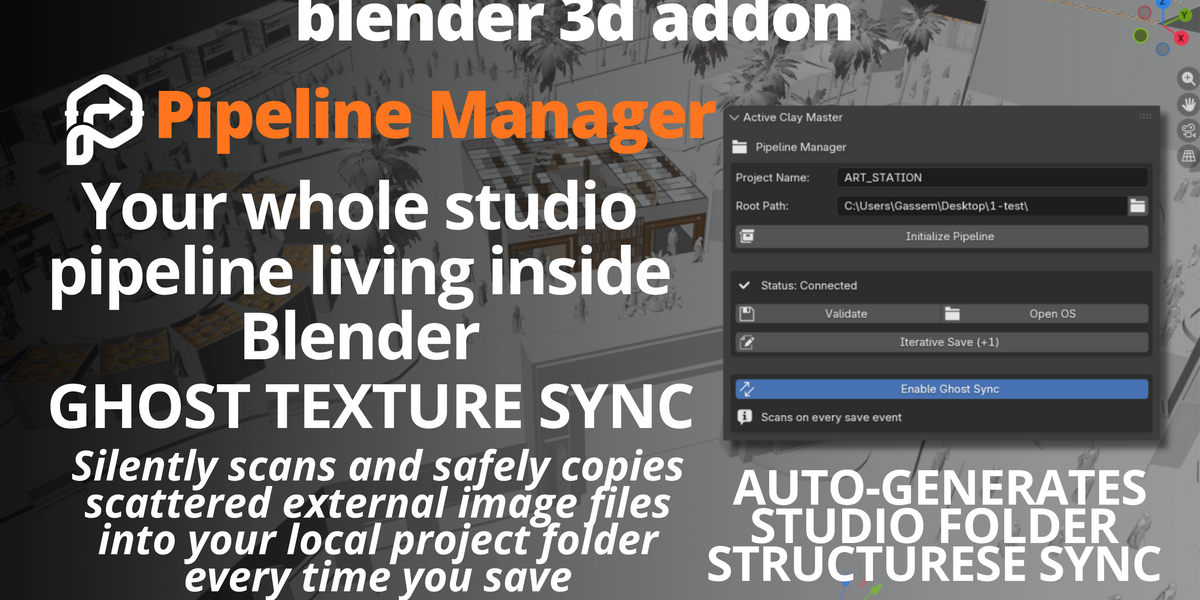
The product listing gives Blender 4.2 through 5.2 as the compatible range. After installation, open the Sidebar in Blender’s 3D Viewport with the N key, then choose the Active Clay tab. In the Pipeline Manager panel, enter a Root Path and Project Name, then select Generate & Link Project. The add-on creates the folder structure, saves the .blend file, and sets the rendering output paths.
Keep external textures with the project
After project setup, add external images to materials as usual. When you save with Ctrl+S, Ghost Texture Sync copies those images into the project’s 02_Assets/Textures folder and relinks their paths. The add-on copies source files, leaving the originals in a master texture library unchanged. Its FAQ says packed data blocks are ignored; the sync is intended for standard external image files loaded from local drives, such as PNG, JPG, and EXR.
Save iterations and choose a fit
Pipeline Manager’s iterative saving increments the version number automatically, helping preserve earlier work instead of overwriting it. The creator describes the add-on as intended for freelancers and small studios that want a production folder structure and texture workflow without building a pipeline from scratch. Read the product FAQ for details about texture syncing.