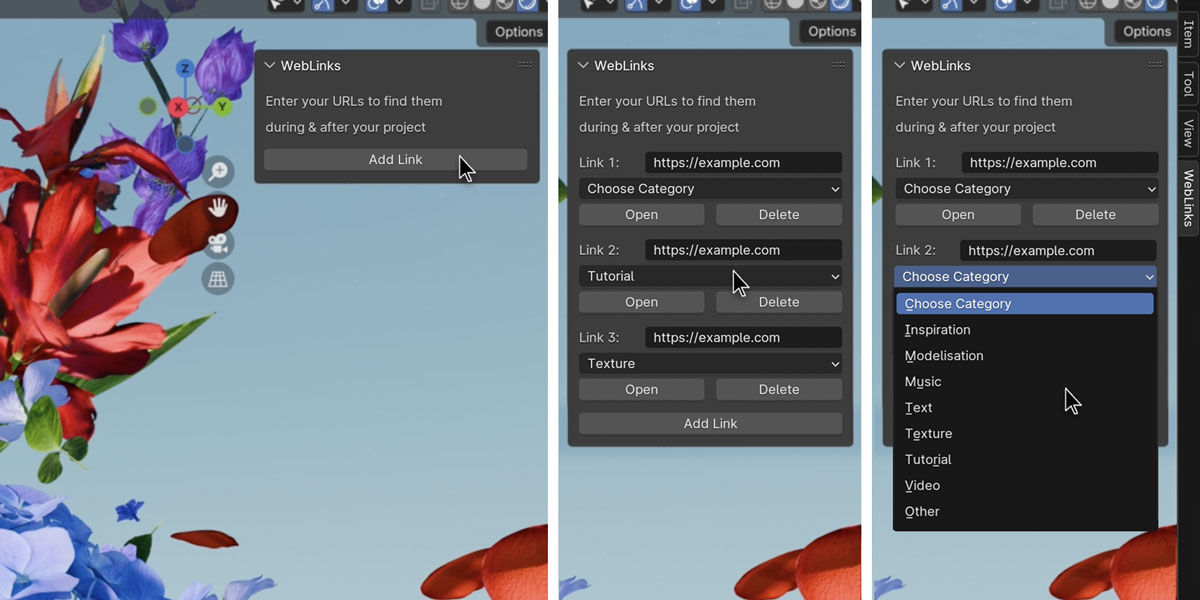
WebLinks is a Blender add-on by didWee for keeping external URLs accessible while you work on a project. External references can include documentation, tutorials, images, and other online resources. You can add, categorize, and delete links inside Blender instead of managing those references only in a separate browser bookmark list.
Organize project references
WebLinks is aimed at Blender projects with many external references, including intricate or extensive 3D work. Categories help group URLs by their use, and the add-on gives you a place to return to those references during production.
Compatibility and license
The Superhive product listing includes Blender versions 3.0 through 4.3. For a Blender release later than 4.3, check the current listing or developer documentation before installing. Superhive identifies the license as Royalty Free. AnyPlugins lists the add-on as free; check the product listing for current access and licensing terms.
Install and open WebLinks
Download the add-on file from the video description, then install and activate it through Blender's preferences:
- In Blender, open Edit and choose Preferences.
- Select Install Add-on, locate the downloaded file, and install it.
- Activate the add-on in Blender's preferences.
- Open the N panel to find WebLinks and begin adding project URLs.
WebLinks suits artists who want categorized web references available from Blender while they work.