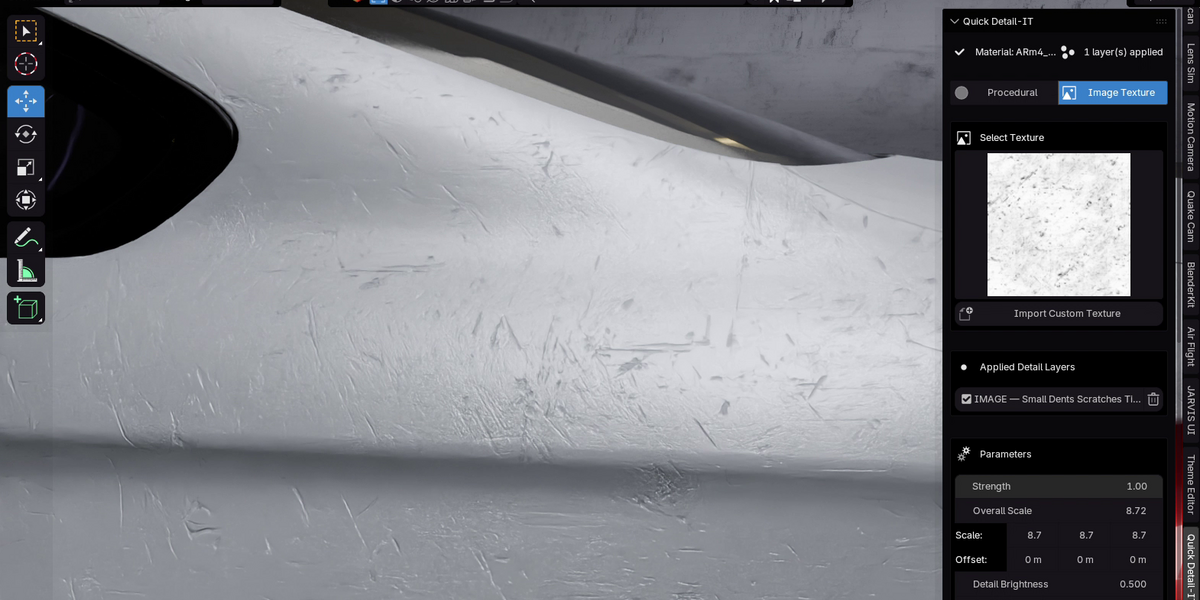
Quick Detail It is a Blender add-on for adding surface details to materials through non-destructive node routing. It supports scratches, rust, dust, fingerprints, and custom textures, with procedural controls for seed, scale, and intensity in the sidebar.
Each applied detail sits in a labeled, color-coded node frame. You can stack several effects while keeping them separate from the base material nodes.
Procedural controls and preset library
The procedural library covers ten material categories, each with ten customizable presets:
- Metals, wood, stone, fabric, and plastic
- Concrete, leather, glass, organic materials, and paint
The add-on also includes ten tileable PBR texture sets: rust, metal scratches, wood grain, stone veining, fabric weave, plastic scuffs, concrete rough, leather grain, paint flakes, and organic scales. Each set loads Color, Roughness, and Normal maps automatically.
Choose which channels each layer affects
For each detail layer, the interface lets you toggle Base Color, Roughness, Normal/Bump, Metallic, and Displacement. This lets you keep a detail to the channels that suit the material, or combine several channel effects within the same layered workflow.
Import your own texture maps
Quick Detail It can import texture maps from its interface. It copies the maps into the library and adds an interactive preview. If an imported set has no normal map, the add-on generates a flat normal map fallback.
Version and compatibility
The listing identifies version 1.2.0 and a GNU General Public License v3 license, and the catalog lists the add-on as free. The product heading says Blender 4.0+, while its details section lists Blender 4.4–5.2. Check the Superhive product listing for compatibility with your Blender version before installing.