Quick Lattice is a Blender add-on by carlosmu that automates lattice cage setup for deforming an object. It configures the cage and modifier so you can make non-destructive model changes without setting up each lattice by hand.
What Quick Lattice sets up
The add-on handles several parts of the setup:
- Lattice size, position and rotation
- Resolution and interpolation
- The modifier used for the deformation
After the cage is created, deform the model with the lattice. You can change the selected behavior later from Blender's last operation panel or the lattice properties.
Start a lattice deformation
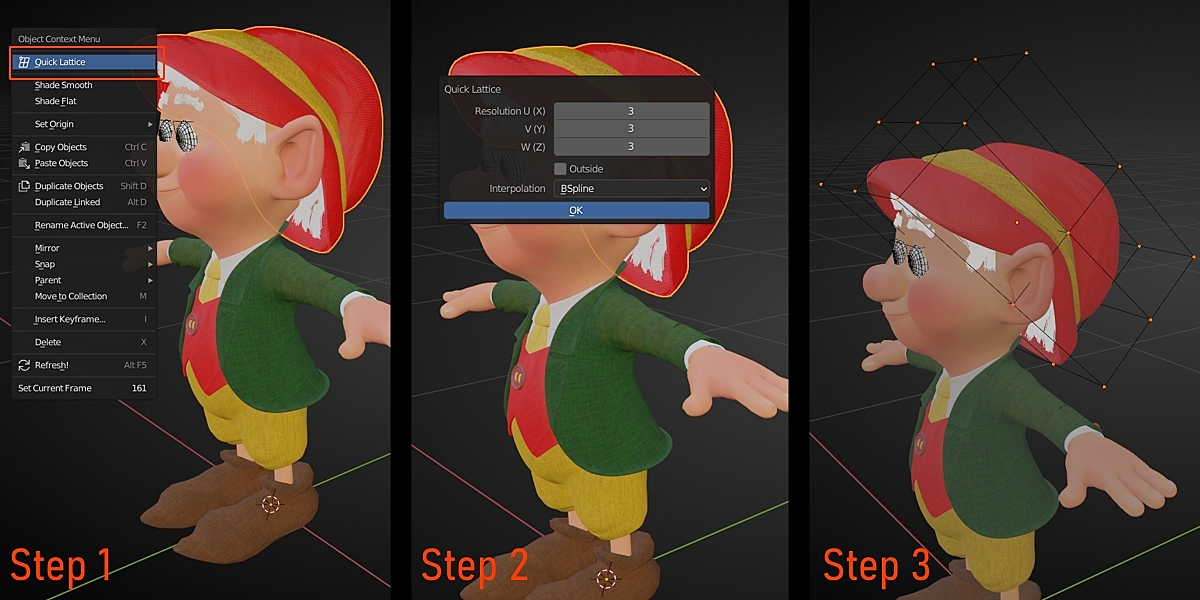
- Select the object you want to modify.
- Right-click to open the context menu and choose Quick Lattice. If you use Right-Click Select, press W to open the menu.
- Choose the behavior, then deform the model with the created lattice.
Version 0.8 also includes a panel as an alternative to the context menu.
Preferences in version 0.8
The add-on preferences let you turn the popup shown during lattice creation on or off and choose default resolution and interpolation values. The version 0.8 listing, dated April 9, 2021, also describes a default behavior preference, an option to deactivate the context menu button, and an option to skip entering Edit Mode after creation. You can set custom names for the lattice object and modifier, and add a prefix to the object name.
Compatibility and installation
Superhive's product details list Quick Lattice as a Blender Extension-compatible add-on under the GPL license, with Blender versions 3.6 to 4.4. An FAQ entry on the product page gives the older, broader range of Blender 2.83 and higher. The product details and FAQ conflict, so compatibility outside Blender 3.6 to 4.4 remains unclear.
The documented installation uses a downloaded quick_lattice_[version].zip file, installed from Blender's Preferences under Add-ons, then activated. Remove an older copy before installing. When updating from version 0.7 to 0.8, remove the old version, restart Blender, and then install version 0.8; the product instructions say the new preferences may not load otherwise.
Rotated-pivot caveat
If the object's pivot is rotated but the object itself is not, the lattice may be oriented unexpectedly. The product documentation recommends applying the object's rotation with Ctrl + A before creating the lattice.
See the Superhive product listing for product details and the installation and usage documentation.