Quick Snapshot Camera by Imaginatta is a Blender add-on for saving and reusing camera views without adding a separate camera for each shot. The product listing identifies version 3.0.1 and Blender compatibility from 4.2 to 4.5. Each snapshot can store position, rotation, focal length, lens shift, depth of field settings, and Focus Tracker Mode.
Save and switch between camera views
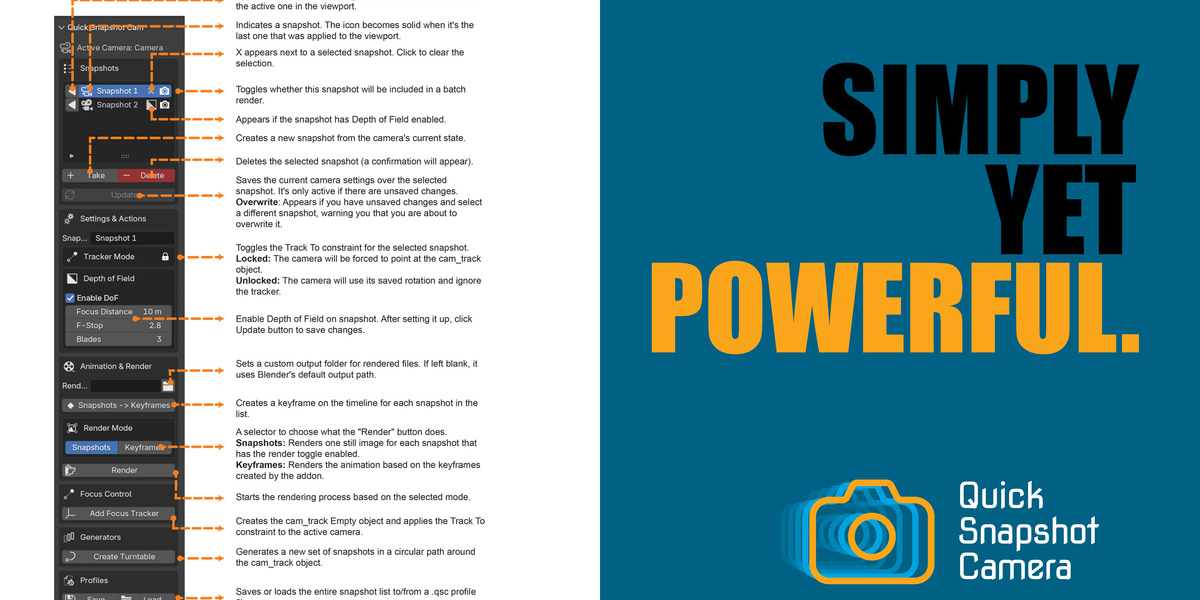
Create a snapshot from the active camera, give it a name, then apply it later to restore that view. Snapshots preserve more than camera position: their saved state includes lens settings and depth of field, including the focus object and F-stop. Focus Tracker Mode records whether the view uses the tracker.
The interface marks the active snapshot and displays an unsaved-changes warning after you edit the camera. With unsaved camera changes, selecting a different snapshot turns the Update button red and changes its label to Overwrite, warning that saving would replace that snapshot's data. The official documentation describes the list and its controls.
Make camera animations and batch renders
Quick Snapshot Camera can convert the snapshot list into timeline keyframes. Choose the frame spacing between keyframes to set up transitions or hard cuts. For an orbit, add a Focus Tracker at the 3D cursor, set the orbit angle and number of snapshots, and generate a circular set of camera views around it.
The render panel can render selected snapshots as separate stills or render the timeline animation after keyframes have been created. Each snapshot has a render toggle, and you can set a dedicated output folder. If you leave the render path blank, Blender uses its default output path.
Reuse a setup in another project
Save the snapshot list and its settings to a .qsc profile, then load that file into another Blender project to restore the setup. This can help when you repeat product views, architectural viewpoints, or storyboard shots across projects. The download listing also includes the add-on ZIP, documentation with a UI reference, and a tutorial .blend scene.
Installation and compatibility
The documentation describes installing the ZIP through Blender's Edit > Preferences > Add-ons panel, then enabling the add-on. With a camera selected, its panel appears in the 3D View sidebar, which you can open with N. The product listing specifies Blender 4.2 to 4.5; check the current product page for compatibility and download details before installing.
This add-on is suited to Blender users who need several saved views, repeatable still renders, or a camera sequence from one scene.