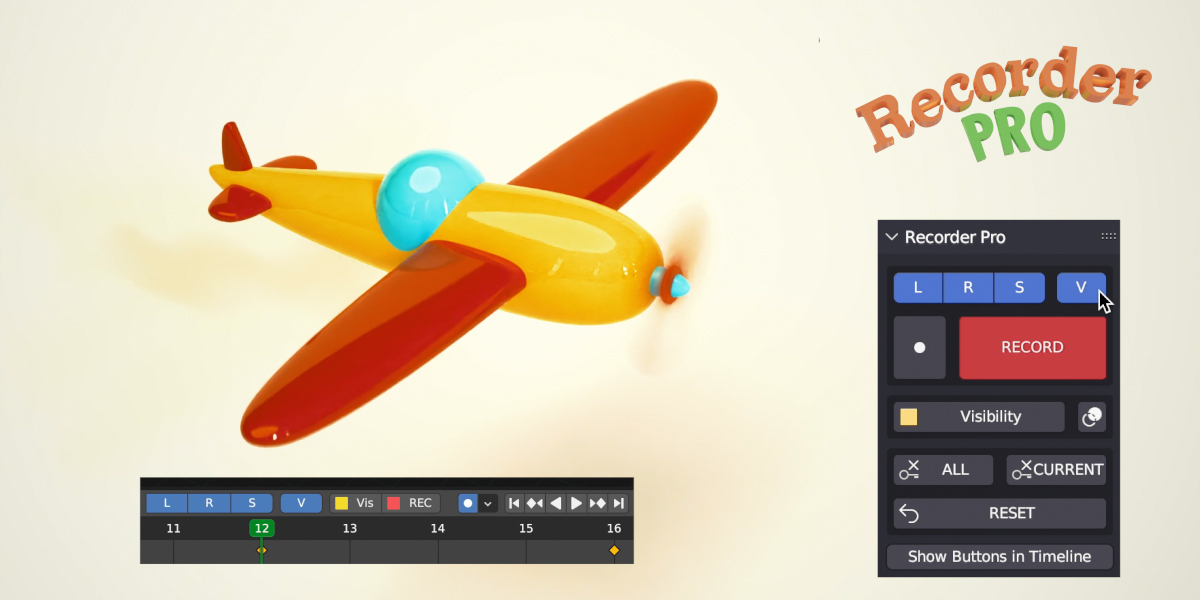
Recorder Pro is a Blender add-on by jkdesign for recording keyframes across selected objects and properties with one RECORD control. It supports location, rotation, scale, and visibility for objects, cameras, lights, and bones in Pose Mode. The Superhive product listing warns that Blender 5.0.0 RC and later are unsupported while an update is in progress; seller documentation describes its controls and installation steps.
Record keyframes across selections
Choose a property with the L, R, S, or V controls for Location, Rotation, Scale, or Visibility, then select the items to animate. Press RECORD, move to another frame and adjust the selected items, then press RECORD again or use SHIFT+R. Recorder Pro creates keyframes for the selected items and properties.
The add-on's sidebar panel is in the 3D Viewport. Press N to open the sidebar, then find the JK panel. Recorder buttons are also available in the Timeline, Dopesheet, and Graph Editor. The interface includes Autokey and overlay options.
Record visibility changes manually
To keyframe visibility, select an object, choose V, and press RECORD. Move to the target frame, click the visibility button, then press RECORD again. The seller notes that visibility does not update through Autokey because of Blender limitations, so use the RECORD control for those changes.
Delete or reset selected keyframes
Recorder Pro can delete all keyframes or the current frame's keyframes for selected objects and properties. A separate Reset control resets the selected properties on the selected objects.
Installation and compatibility
In Blender, open Edit > Preferences, go to Add-ons, click Install, and load the Recorder Pro ZIP without unzipping it. Enable the add-on, then open the 3D Viewport sidebar with N and find the JK panel.
The Superhive warning says Recorder Pro works in Blender 4 through Blender 5.0.0 alpha, but not in Blender 5.0.0 RC or later; an update is in progress. The Details section also lists Blender 3.0 through 3.5, ; confirm support for those versions with the seller. Version 2.0.0 updated icons for Blender 4.2 and later, made a minor interface update, and added compatibility with Timeline Pro's playback display.
AnyPlugins lists Recorder Pro as free, while the Superhive listing identifies its license as GPL. Check the current seller listing for availability and terms.