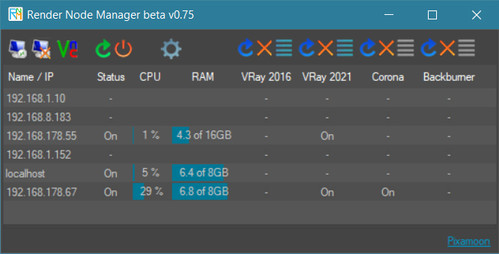
Render Node Manager is pixamoon’s network tool for controlling distributed rendering processes on selected 3ds Max servers and nodes. It can remotely start, restart, or stop VRaySpawner, Corona DrServer, and Octane Daemon. It helps when a canceled distributed render leaves nodes slow to pick up work again.
Connect to render nodes
The version 0.75 listing describes two connection methods. RNM Server runs a small server program on each node and uses a shared network exchange path visible to every node and the workstation; for this method, connections work only for IPs on the configured node list. The listing describes classic Remote Desktop as supported but not recommended in the newest version it identifies, 0.75.
Monitor node status and usage
Render Node Manager reports whether a node is on or off, along with CPU usage, memory usage, and distributed rendering status. These readings help you check the state of the machines and their renderer processes when investigating a node that has not resumed work.
Compatibility and licensing
The listing identifies version 0.75 and gives Windows 7, 8, and 10 Professional or Ultimate as compatible editions. Confirm requirements with pixamoon before installing. License price depends on how many nodes one license can control, and each license activates on one PC. Pixamoon’s page shows a $9.00 price alongside a node-count selector, so check the selected node amount and price before purchasing. Pixamoon says activation details are sent by automated email within a few minutes after purchase; enter an email address that can receive the message.
See pixamoon’s product page for licensing options. Pixamoon links to ScriptSpot for full information and the changelog.