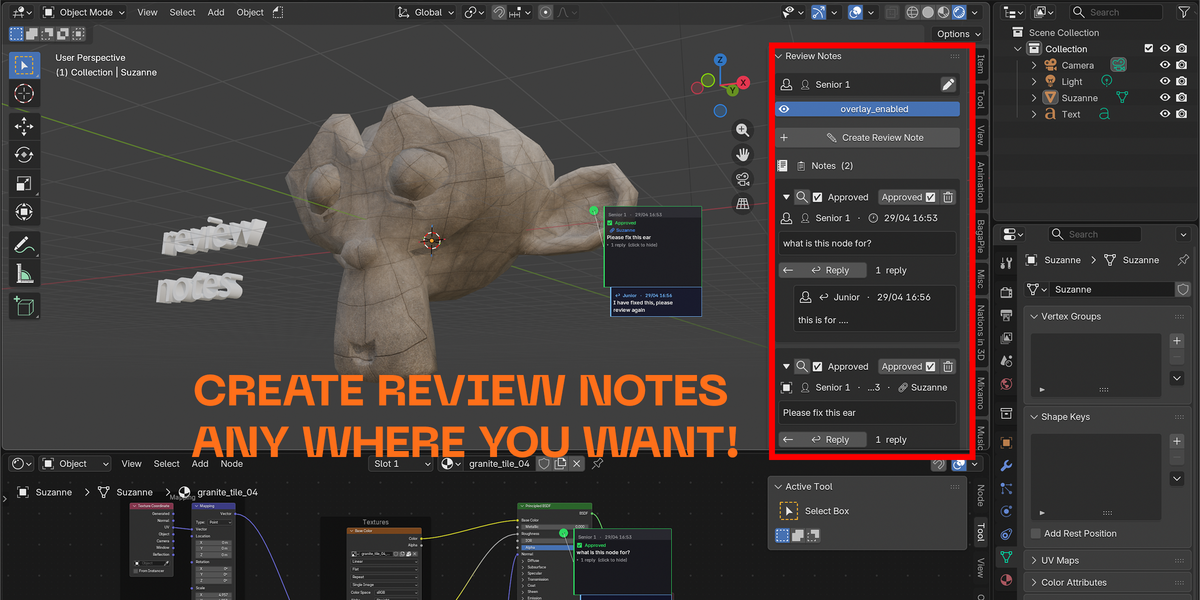
Review Notes is a Blender add-on for keeping review comments attached to the part of a project they describe. A reviewer can pin feedback to a mesh surface, shader node or socket, material slot, modifier, bone, or UV map. Notes stay in the Blender file, where the artist can inspect and respond to them in context.
Pin feedback to a specific part of the project
Surface notes follow the mesh as it is transformed. Other notes can attach to individual shader nodes and sockets, or to items such as materials, modifiers, bones, and UV maps. Review Notes works across the 3D Viewport, Node Editor, Shader Editor, Image Editor, Sequencer, Dopesheet, NLA, Graph Editor, and Clip Editor.
Color-coded statuses mark notes as approved or resolved. Artists can reply in a note thread, and a one-click jump takes the reviewer to the note's location. An overlay toggle hides or shows the pins without removing them.
Use it for a file-based review handoff
The documented workflow passes the Blender file between supervisor and artist. The supervisor adds notes to problem areas, and the artist opens the file to find each comment, make changes, and reply in its thread. The supervisor can review the fixes, approve notes, and export a CSV report for documentation or sign-off.
The export includes notes, replies, statuses, and attachment information. That gives a production lead a record of feedback alongside the project review.
Compatibility and installation
The product listing specifies Blender 4.5 through 5.1 and says the add-on was tested on Blender 5.x. It also lists Cycles and Eevee and identifies the license as GPL. Check the product listing for current details.
To install it, download the add-on folder or ZIP, open Blender's Edit → Preferences → Add-ons panel, and choose Install from Disk. Enable Review Notes, then open the sidebar with the N key and select its panel. The product documentation describes the note controls and review workflow.



