Robocopy Backup Script is a Windows-only incremental backup script by Soyoyo. It uses Robocopy, a file-copy tool included with Windows, to preview differences between source and destination folders before asking whether to mirror the source to the destination. The /MIR operation also deletes destination files and directories absent from the source. The marketplace lists it in its Blender catalog, but the creator says it is not a Blender add-on.
What the script checks before copying
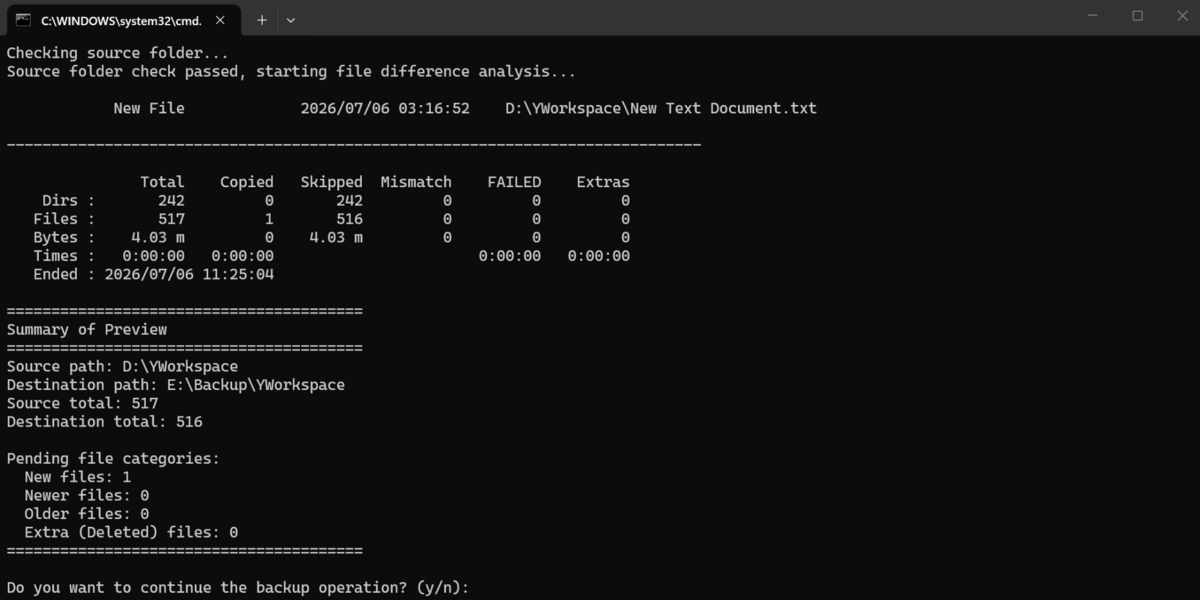
Before a run, the script checks whether the source folder is empty and counts files in both folders. Its summary lists new, newer, older, and extra files. It warns when it finds older or extra files so you can review the differences. Enter n to cancel; the listing says cancellation leaves the source and destination untouched. Enter y to begin the backup.
How to read the file summary
- New: The file is in the source but not the destination.
- Newer: The file exists in both folders and is newer in the source.
- Older: The file exists in both folders and is older in the source.
- Extra: The file is in the destination but not the source, often because it was deleted from the source.
Review the mirror operation first
The script uses Robocopy’s /MIR parameter to mirror the source to the destination, deleting destination files and directories absent from the source. Check the older and extra file counts before confirming, especially if the destination contains files you need to keep. The creator recommends trying the script on a test project first. For backups on one machine, the listing recommends using a separate drive for the destination rather than the source drive.
The script also uses /FFT, which allows a two-second difference when comparing file timestamps. You can edit the Robocopy command parameters for more control if you understand Robocopy.
Where it works
Both the source and destination must be on Windows. The listing says the script supports local area network backups but not backups over the Internet. It identifies the license as GPL. Check the Robocopy Backup Script listing for current product details.