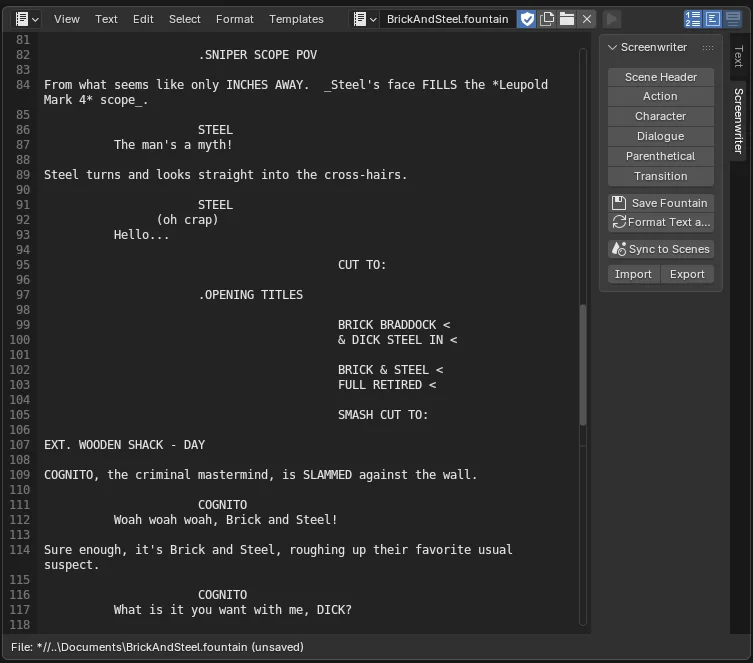
Screenwriter is a Blender add-on for formatting screenplay text in the Text Editor, working with Fountain files, and creating Blender Scenes from script scene headings. The Blender Extensions record lists add-on version 1.0.0 and Blender 4.2.0 as the minimum Blender version. View the Screenwriter listing on Blender Extensions.
Format screenplay text in Blender
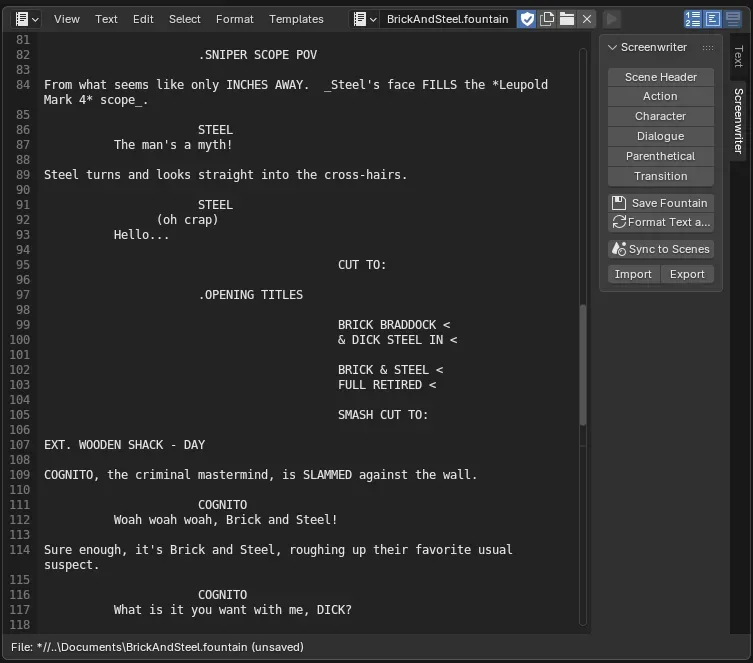
Open the Screenwriter panel in the Text Editor sidebar with the N key. Its formatting tools handle scene headings, action, character names, dialogue, parentheticals, and transitions. Scene headings use formats such as INT. and EXT.; character names are centered and uppercased, while transitions such as CUT TO: are right-aligned. Review Screenwriter's Fountain import and scene-sync features.
Import and export Fountain files
Screenwriter imports .fountain files by opening or dragging them in, with automatic detection and visual indentation, and exports .fountain files. A Save Fountain control overwrites the current Fountain file. The Blender Extensions API lists permission to read and write .fountain files and the GPL-3.0-or-later license. Check Screenwriter's version, file permission, and license in the Blender Extensions API.
Sync script headings to Blender Scenes
Sync to Scenes analyzes scene headings in a script and creates corresponding Blender Scenes. This can carry a screenplay's scene outline into Blender for layout or storyboarding work
Compatibility and a reported issue
The Blender Extensions record sets Blender 4.2.0 as the minimum version. The listing also contains one review reporting crashes in Blender 4.3 on a Surface tablet. That single report does not establish a general compatibility problem, but it is a reason to test Screenwriter on your own system before relying on it for a project.