Color selected mesh objects and vertices in Blender
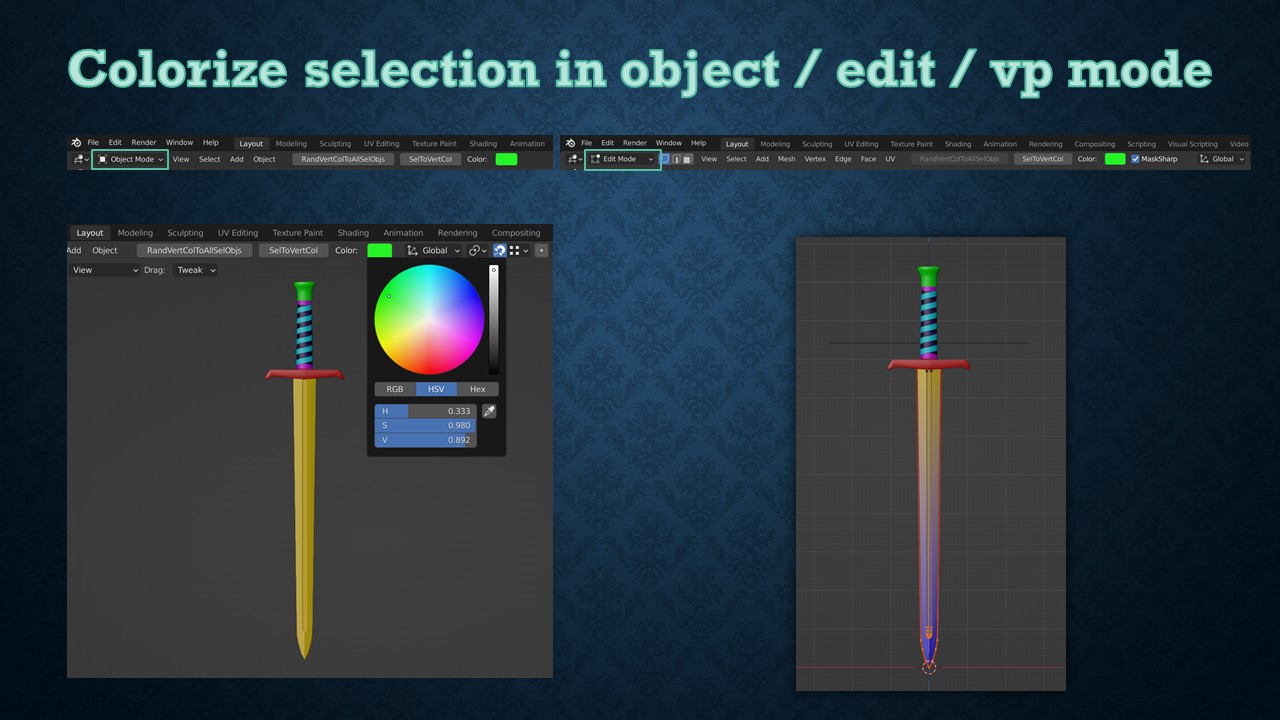
Selectedtovertexcolor is a Blender add-on for assigning vertex colors to selected mesh-based objects or vertices. In Object Mode, you can give one object or several selected objects the same chosen color, or assign each selected object a different random color. In Edit Mode, the add-on colors selected vertices. These options can help when preparing an ID map or applying visual colors during modeling.
For a chosen color, use the SelToVertCol button or the default Ctrl+Shift+V shortcut; the shortcut is customizable in the add-on preferences. Random coloring uses the separate RandVertColToSelObjs button.
Edit Mode and Vertex Paint options
In Edit Mode, the MaskSharp option keeps color within the selected face bounds. With it off, the color blends into surrounding vertices for a smoother transition. The documentation says Edit Mode works on one object at a time, but also says child objects must be selected to affect them; it does not clarify whether those children are colored in the same operation.
The documentation lists controls in Vertex Paint mode. With Blender's native paint mask active, the add-on colors masked areas; without a mask, it colors the whole object. The V1.1 notes say SelToVerCol can start from vertex color mode, where random color is unavailable.
Vertex color layers and display
The add-on creates a vertex color layer if one is not present and sets it as the active render layer. The documentation notes that when an existing layer has a name other than Col, the add-on creates and activates a new layer. In Object Mode, it switches to the visual render mode to display vertex colors.
Compatibility and license
The Superhive listing enumerates Blender versions 2.8 through 3.2. Its documentation says the add-on was made for Blender versions higher than 3.0, so the stated range is ambiguous. Check the current listing or ask the developer about your Blender version before installing. The listing identifies the add-on's license as GPL.