Shot Master by Creative Skipper is a Blender add-on for organizing animation shots, cameras, markers and camera constraints in one workflow. Its shot list links each named shot to a camera and frame range. The release notes list version 1.3.0; batch rendering of selected shots was added in version 1.2. See the release notes for the version-specific changes.
Organize shots and cameras
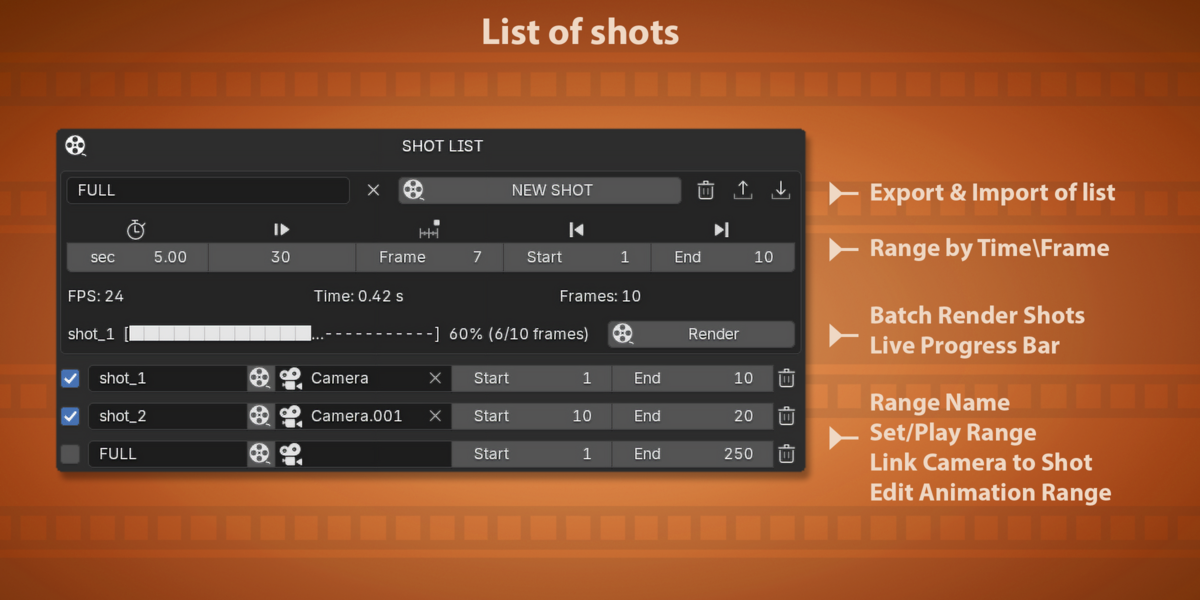
Create shots and set their frame ranges by time, by a specified value or from the current frame. Each shot can have its own camera, which activates when you set or play that shot unless a marker in the shot has another camera assigned; markers take priority. You can import and export shot lists, and the camera list lets you create named cameras, adjust focal length and choose orthogonal, perspective or panoramic mode.
Render selected shots in a batch
Mark shots with the “Render This Shot” checkbox to include them in a batch render. Shot Master switches cameras automatically during the batch and shows the current shot, progress percentage, rendered frame count and render status. When the output is an image sequence, each shot is saved in its own folder, with the shot name included in the file name.
Work with markers and camera controls
Use markers as timeline navigation points: create, rename, move or duplicate them, then bind a camera to a marker with one click. Shot lists and markers can both be imported or exported. Camera constraints include one-click object tracking. The quick panel can set and highlight the active camera, navigate collections, and rotate cameras toward the 3D cursor.
Version 1.3 changes
Version 1.3.0 adds rendering from the Video Sequencer, including shots without an assigned camera. Its shot list can be shared across scenes, and shots can be merged from other scenes. The update also adds settings to hide unused panels and confirmation dialogs for clearing a shot list or removing a frame range; the confirmation for removing a frame range can be disabled in settings. The product listing names Blender 4.0–5.2 and says version 1.3 does not support Blender 3.6 or lower.