Shots Shuffler is a Blender add-on that generates randomized static camera positions for artists and animators exploring angles and framing. You can use an object as a reference or leave the scene empty while exploring viewpoints. Each generated view is a separate camera position that you can cycle through.
Explore camera viewpoints
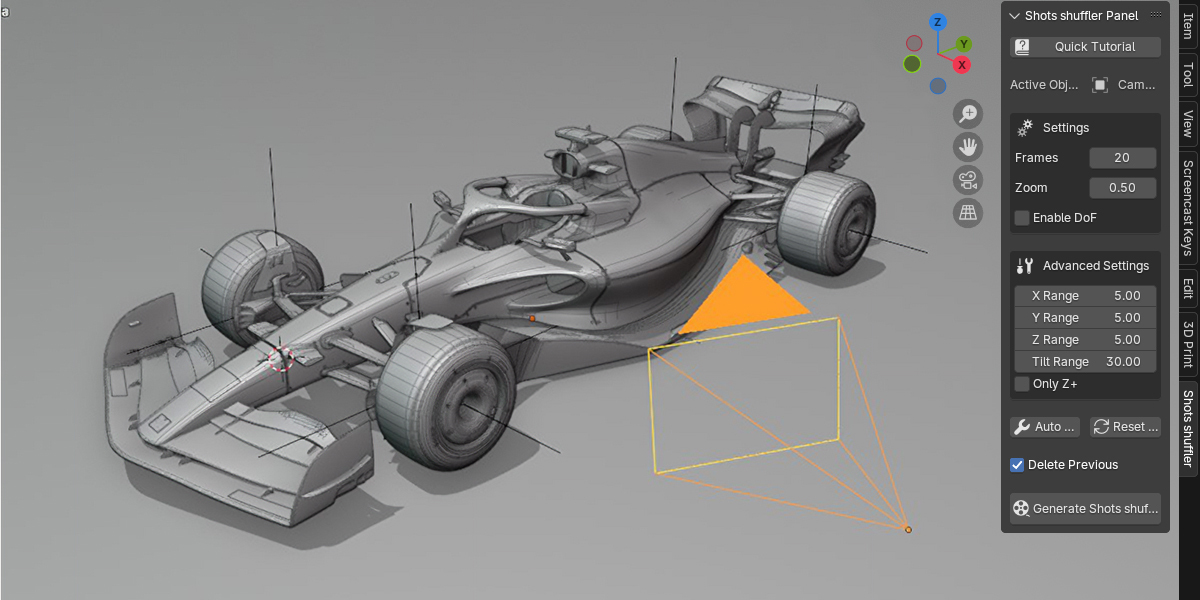
Open the Shots Shuffler panel in Blender's 3D Viewport, set the number of shots, then generate a batch of cameras. Review the resulting views to compare compositions while a scene is still in development.
Adjust ranges, zoom and tilt
Set movement limits along the X, Y and Z axes to suit the scene. Auto Setup Ranges calculates those limits from the dimensions of the selected object. The Zoom setting controls the scale of movement from close-up to more distant views, while Tilt Range varies rotation around the Z axis.
- Frame Count sets how many static shots to generate.
- Delete Previous removes cameras generated by Shots Shuffler in the current scene before creating new ones.
- Reset Sliders restores the settings to their defaults.
- Debug messages provide feedback during operation, including when an object is missing.
Very small or irregularly shaped objects may need manual camera-position adjustments after generation.
Install and check compatibility
Download shotshuffler.zip from Superhive. In Blender, go to Edit > Preferences > Add-ons, choose Install, select the ZIP file and enable Shots Shuffler. The add-on appears in the Tool Shelf under its own tab, with its panel in the 3D Viewport.
The Superhive listing marks Shots Shuffler as Blender Extension Compatible and lists Blender versions 3.0 through 3.6 and 4.0 through 4.3. It identifies version 1.0, the GPL license and Valerio Fissolo of Unkredible Studios as its creator. Check the Superhive product listing and documentation for current details.