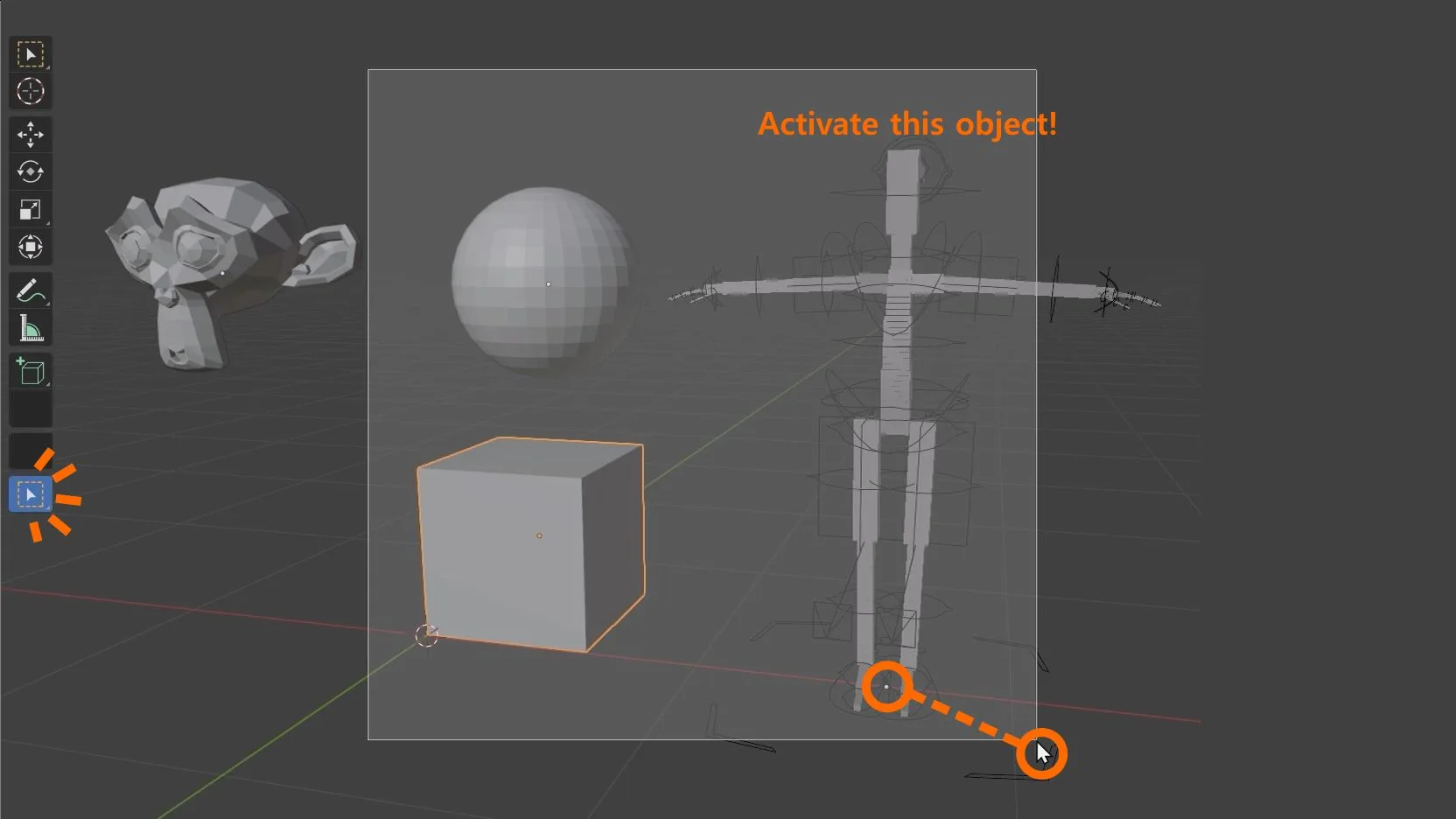
Smart Box Select is a Blender add-on by R4V3N for box and lasso selection in the 3D View. Blender’s default Box Select can select several objects without changing which one is active. Smart Box Select and Smart Lasso Select make the object nearest the mouse cursor active during selection. The Blender Extensions listing says this limitation is painful for animators using a pen tablet.
How the selection tools work
Drag with Smart Box Select or Smart Lasso Select to select objects. Hold Shift while dragging to extend the current selection; hold Ctrl while dragging to subtract from it. In version 1.0.2, a drag that travels too short a distance is treated as a click.
This active-object behavior can help when selecting an armature in Object Mode: the extension listing notes that Blender’s default Box Select does not make an armature active, so you must click it separately.
Who may find it useful
The extension listing identifies Smart Box Select and Smart Lasso Select as separate tools but does not say whether either can be made the default Box Select action.
Compatibility and installation
The extension record lists version 1.0.2 and Blender 4.2.0 as the minimum version. It is licensed under GNU GPL version 3.0 or later. The listing provides drag-and-drop installation and an Install from Disk option; for the latter, follow the Blender manual’s installation instructions. The developer’s GitHub issue tracker is linked for reporting problems.