Smart Simplify Pro is a Blender add-on for managing levels of detail (LODs) in collections. It switches between configured object and modifier states for tasks such as animation playback, posing, and viewport work, reducing the need to toggle each state by hand.
Set up LODs for a collection
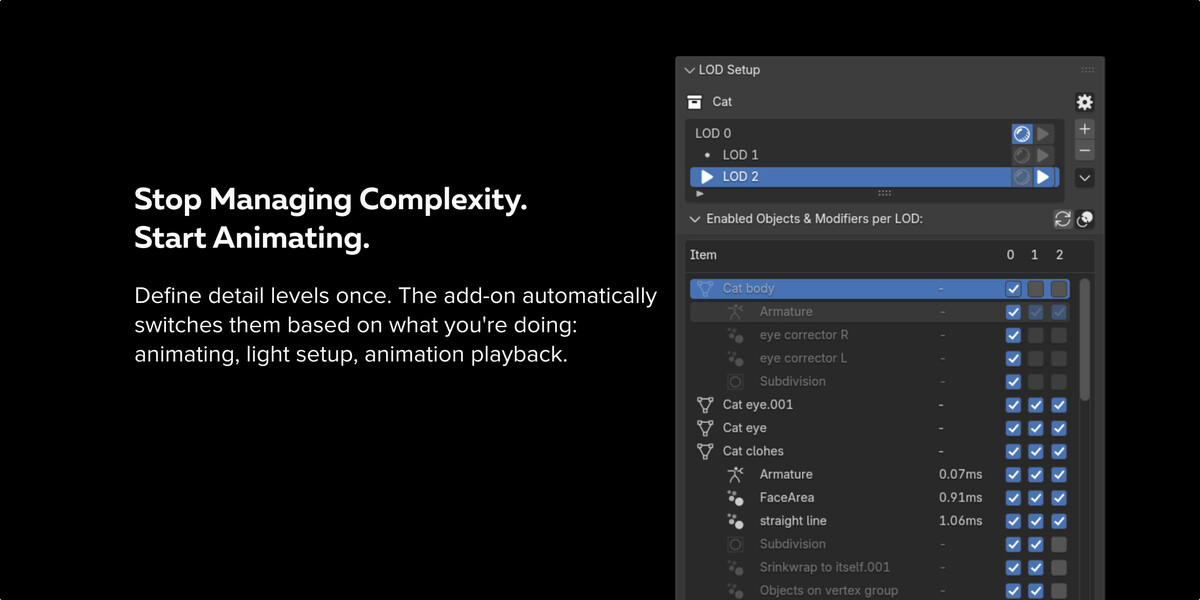
Open the 3D Viewport sidebar with N and choose the Smart Simplify tab. Select an object in the collection, choose Create LOD System, and select the parent collection. The add-on creates the first level, LOD 0. Add more levels from the LOD list; each new level copies the settings of the currently active level. Then adjust which objects and modifiers are enabled in each level. You can rename levels, such as Playback and Render, to make their roles easier to recognize.
Each collection can have its own LOD levels, object and modifier settings, switcher assignments, and active level. That lets a scene use different detail setups for separate collections, such as a character and its environment.
Switch levels by context
Switchers can activate a selected LOD when the viewport changes shading mode, animation plays or scrubs, or the active object is outside the managed collection. Keyboard switchers can also toggle between LOD states in their configured modes. Assign a target level to each switcher for each collection. Multiple switchers may be enabled, while only one LOD level can be active at a time.
Scene-wide setters can change viewport overlays and shading settings when a switcher activates. Subdivision setters can change render simplification levels. The Smart Simplify Pro documentation describes the available switchers, setters, and setup steps.
Inspect modifier and render states
The enabled objects and modifiers list can display modifier execution times in milliseconds and highlight values above the configured alert threshold. Its rendered-state overlay uses icons to show whether items are rendered or hidden; the documentation says these indicators are for reference and do not change render visibility.
For library overrides, the add-on reports when a system override needs a full override for LOD functionality. Its documentation also describes preserving the override structure while updating execution times.
Compatibility and release notes
The Superhive listing names Blender 4.5 through 5.2, Cycles and Eevee, and the GPL license. The creator's FAQ says the add-on should work with Blender 4.5 LTS and later according to unit tests. Check the current listing and documentation for your Blender release before installing.
Version 1.1.0 added Undo/Redo support for switcher state changes. The version 1.1.1 changelog includes a fix for random crashes during dependency graph updates.