Snap To Custom Grid is a Blender add-on for snapping selected vertices or object origins to the nearest point on a grid you define. Choose the grid spacing and the axes to include, then run the snap command from the 3D Viewport sidebar.
Align vertices or object origins
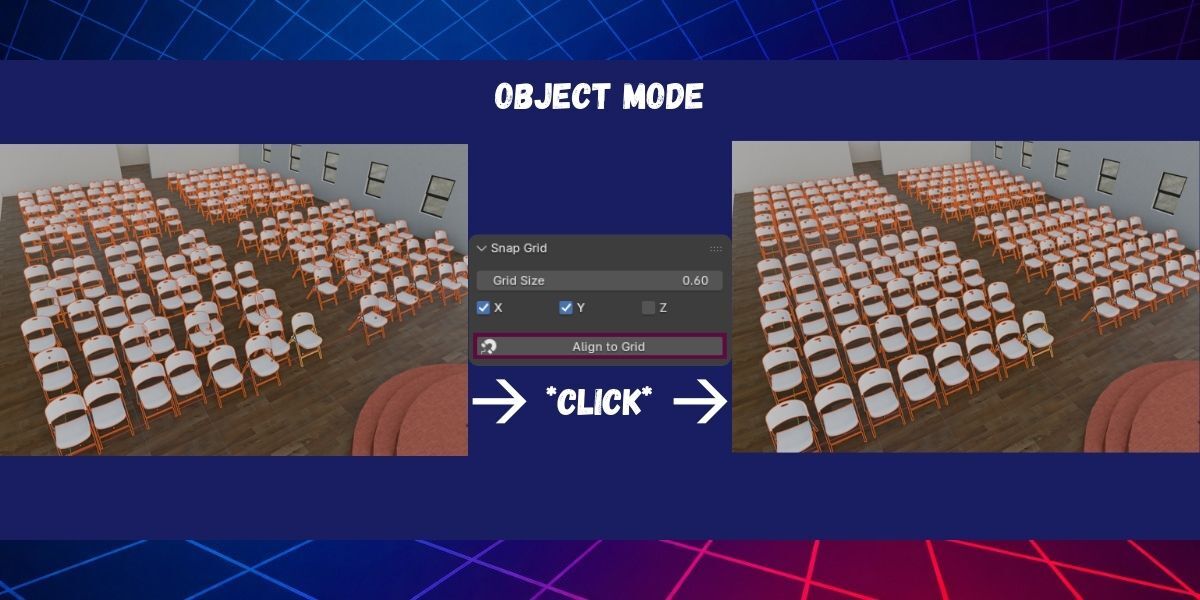
In Edit Mode, the add-on snaps selected vertices. In Object Mode, it snaps the origins of selected objects.
Set the grid spacing and axes
Enter a custom grid size to match your scene or modeling workflow, then toggle X, Y, or Z to choose which axes to snap. For example, the product listing says a vertex at X = 4.99 snaps to X = 5.00 with a grid size of 1.00.
Install and use the add-on
- Before installing, check your Blender version against the listing: it requires Blender 4.2 or newer and lists 4.2 to 5.1 as compatible. If you use a version newer than 5.1, confirm current compatibility first. Then open Edit > Preferences > Add-ons > Install from Disk and enable Snap to Custom Grid.
- Open the 3D Viewport sidebar by pressing N, then select the Snap Grid tab.
- Set the grid size and axis toggles.
- In Edit Mode, select vertices. In Object Mode, select objects. Press Snap to Grid to apply the alignment.
The add-on supports undo, so you can reverse a snap with Blender's undo command.
Compatibility and modeling uses
Version 1.2 was updated for Blender's 4.2 extension system. The Superhive product listing shows the GPL license, support for Windows, macOS, and Linux, and no external dependencies.
Its controls suit technical modeling, architecture, hard-surface work, and modular assets where selected geometry or object origins need to follow consistent increments.