Plan and edit stories inside Blender
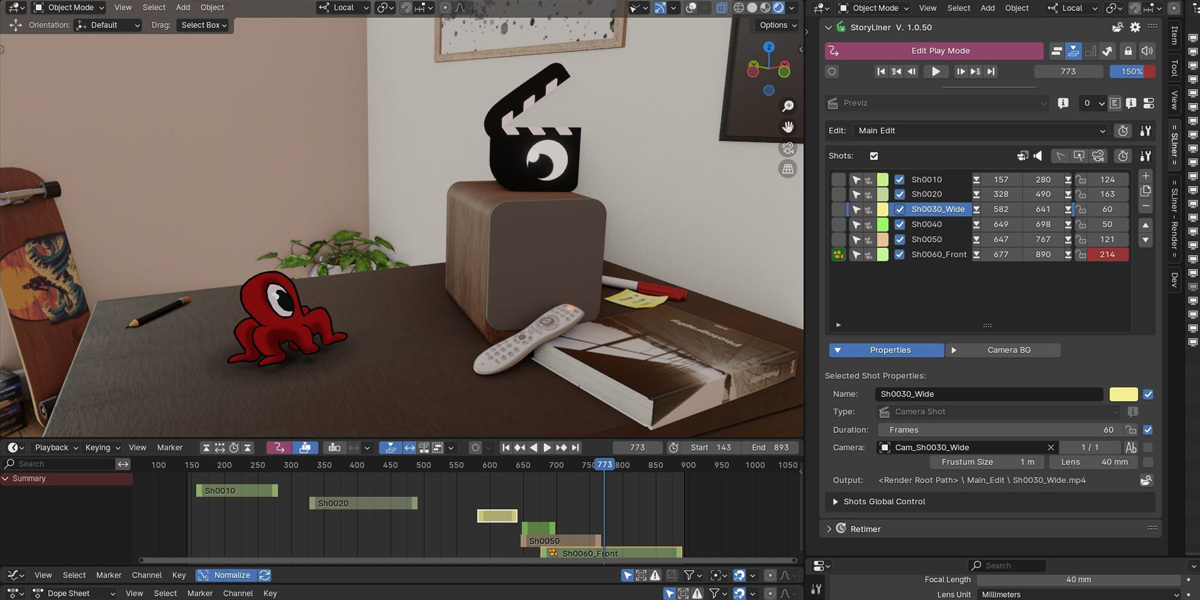
Storyliner is a Blender add-on for storyboarding, camera management, previs and rendering animated sequences. Its editing workspace lets artists, directors and studios arrange shots and review an edit in Blender's 3D View.
Build a non-linear edit from scene shots
Create shots from new or existing scene cameras, set each shot's time range, then arrange the shots in the order the edit needs. Their order does not have to follow the scene's timeline: you can show the same action from different angles, rearrange shots or leave parts of the action out. Edit Play Mode plays the assembled sequence in the 3D View.
Storyliner also supports hybrid edits that combine storyboard shots with camera shots from the scene. Grease Pencil tools let you sketch per shot or draw continuously across shots and onto scene objects. The Retimer provides global and local control over action timing. Project Settings manage production requirements, and camera video and sound backgrounds can be controlled across the project.
Storyboard, render and exchange edit lists
Storyliner can render images, shots, edits and sequences using Eevee, Cycles or a custom playblast. Its independent batch jobs show progress and can be interrupted. You can generate a PDF storyboard during production and export sequences as PDF edit sheets.
For work in another editing application, Storyliner exports edit lists through OpenTimelineIO and can import lists from most editing applications to update the edit in the Blender scene. Check the edition comparison before depending on a particular rendering, storyboarding or exchange feature, since some capabilities vary by edition.
Check the edition and Blender version
Storyliner comes in four editions, each aimed at a different discipline. The feature set is broad, and some storyboard and studio capabilities are edition-specific. The developer's edition overview and feature comparison can help you match an edition to your workflow.
The marketplace listing spans Blender 3.6 to 5.2. The developer's FAQ lists Storyliner 1.6.60 for Blender 5.1 and later, released July 7, 2026, and 1.5.34 for Blender 4.5, released May 17, 2026. Check the current product FAQ and download page for the build that matches your Blender version.
Installation and documentation
The developer says Storyliner is distributed as a legacy add-on rather than a Blender Extension. For version 1.5 and later, its documented installation method is to drag the downloaded ZIP file into Blender and restart the application. See the product documentation for the installation notes, edition links and learning resources, or use the full Storyliner manual for feature details.