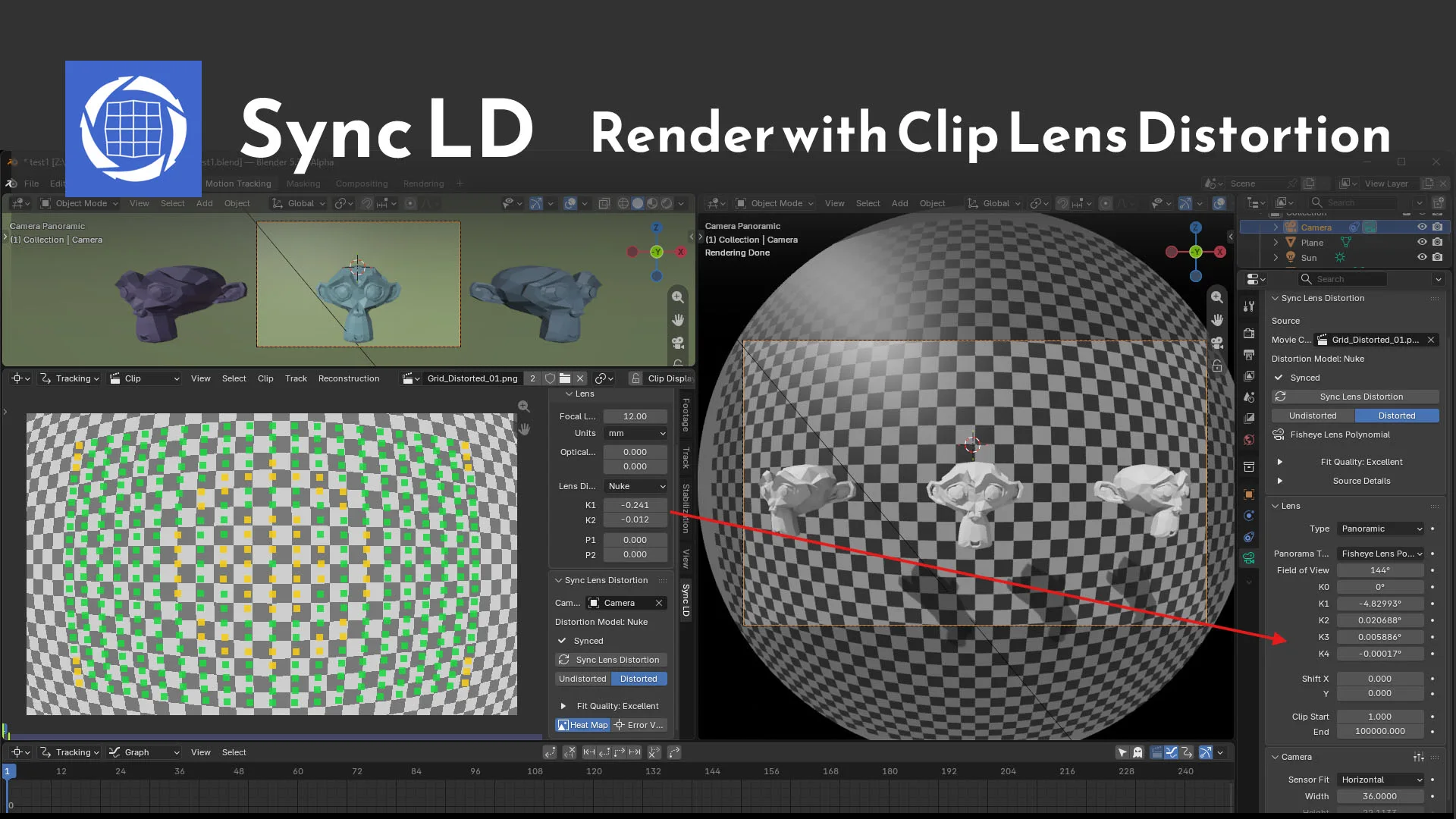
Sync LD transfers lens distortion values from a Blender Movie Clip to a render camera. With the same camera, switch between an undistorted Perspective view and a distorted Fisheye Lens Polynomial projection. Beyond live-action matchmoving, Sync LD lets users adjust or enter distortion in the Movie Clip Editor before applying it to the render camera, which can help when Blender’s Fisheye Lens Polynomial camera settings are difficult to tune by feel. The Blender Extensions listing describes its current features and compatibility.
Choose a sync workflow
Sync LD uses lens settings already stored in the Movie Clip. Those values can come from Blender’s camera solve workflow, another distortion calibration add-on, or manual entry. Sync LD does not calibrate the lens or change the Movie Clip values.
In Camera Data Properties, choose a Movie Clip and sync it to the selected camera. This workflow preserves the scene’s render resolution, pixel aspect, and resolution percentage. The distortion fit uses the Movie Clip’s aspect ratio, even when the scene render aspect differs. In the Movie Clip Editor, the active clip becomes the source automatically. Syncing there updates the scene camera and aligns render resolution and pixel aspect to the clip while preserving resolution percentage.
Switch between undistorted and distorted views
The camera can use Blender’s normal Perspective projection or a distorted Fisheye Lens Polynomial projection. Sync LD may update camera type and panorama projection, focal length, sensor size and fit, camera shift, fisheye field of view, and polynomial coefficients. In the Movie Clip Editor, optional Heat Map and Error Vectors overlays show fit residuals and their direction. These overlays do not change the clip or camera.
Supported models and fit limits
Sync LD supports Polynomial, Division, Nuke, and Brown distortion models. Brown tangential distortion is fitted as a radial approximation, so the result may work for previews and checker comparisons but cannot be mathematically identical to the original model. On Blender 5.1 and later, Sync LD uses Nuke P1 and P2 anamorphic coefficients when they are available and set, though the radial fit limits their matching accuracy. Very wide lenses can show more edge error because the fit uses a fourth-order projection with K0 set to 0.
Render support and fit quality
For Blender 4.2 through 5.2, distorted rendering is supported with Cycles. Blender 5.3 and newer supports it with Eevee and Cycles; Eevee results may differ from Cycles. Fit Quality reports the pixel-space difference between the Movie Clip model and the fitted camera projection. Its RMS guide labels fits Excellent below 0.10 px, Very Good below 0.25 px, Good below 0.50 px, Usable below 1.00 px, and Poor at 1.00 px or higher. Check the rendered result against your own requirements.
Status and release details
Not Synced means there is no valid synced projection for the current source. Synced means the source values still match the stored fit. Out of Sync means those values changed. Error means the latest sync attempt failed and the previous valid camera state was kept. A render aspect change does not invalidate the fit; Sync LD keeps using the Movie Clip aspect and warns when the scene aspect differs. Version 1.0.1 lists Blender 4.2.0 as its minimum version and uses the GPL-3.0-or-later license. The project repository is listed for issue reports.