Text Ops by Creative Skipper extends Blender's Text Editor with tools for handling multiple text blocks, searching and formatting text, and saving reusable text data outside a blend scene.
Manage text blocks and files
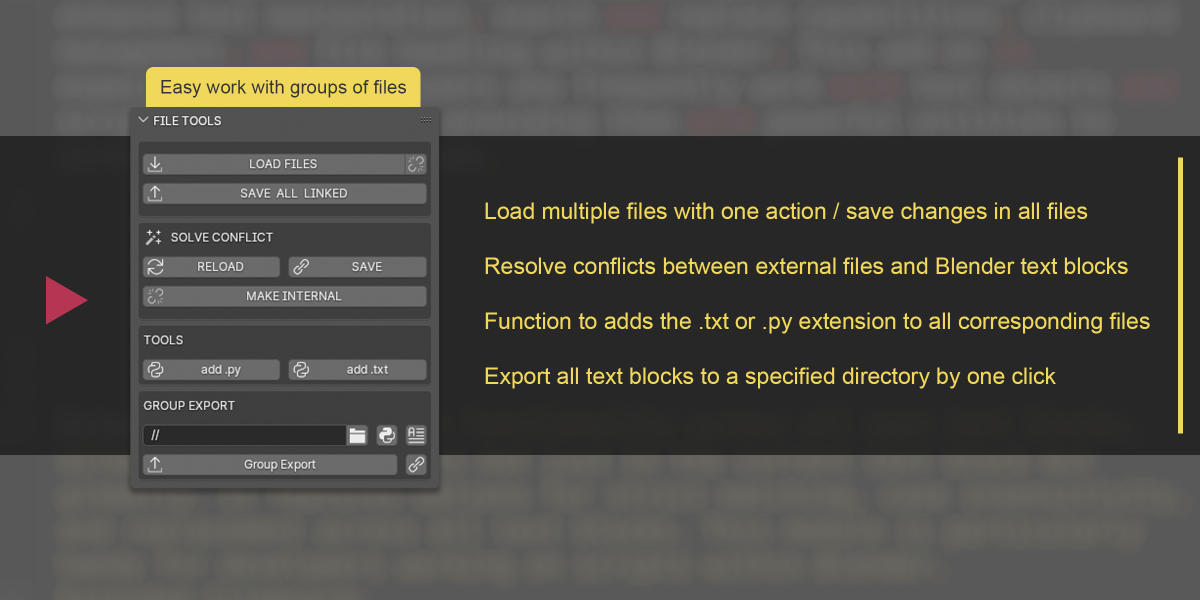
Group Load/Save loads multiple files with one action and saves changes across them in one click. Text Ops also includes conflict resolution between external files and Blender text blocks, adds the .txt or .py extension to corresponding files, and exports all text blocks to a chosen directory.
Search and format open text
Multi Search searches across open Blender text blocks. It can replace text in the current block or across all open blocks. Results show the text block name, line number and number of matches, along with counts of the lines and blocks containing results. Select a result to open its block and jump to the match; repeated clicks on a result cycle through the findings. Separate text operators provide quick formatting functions.
Save reusable text outside the blend scene
The Extended Clipboard stores named text buffers in a JSON file on disk, independently of the blend scene. You can create several purpose-specific buffers and load them when needed. Entries can have unique identifiers, with an optional increment or timestamp added to the identifier. The module also counts words in saved blocks and sorts them by name.
Check compatibility and license details
Text Ops is aimed at Blender users who regularly work with scripts, snippets or other text blocks. The Superhive product listing identifies the license as GPL and lists Blender 3.6 to 5.2. The AnyPlugins listing reports Blender 3.6 to 4.5. Since those compatibility ranges differ, check the developer's listing for your Blender release before installing.