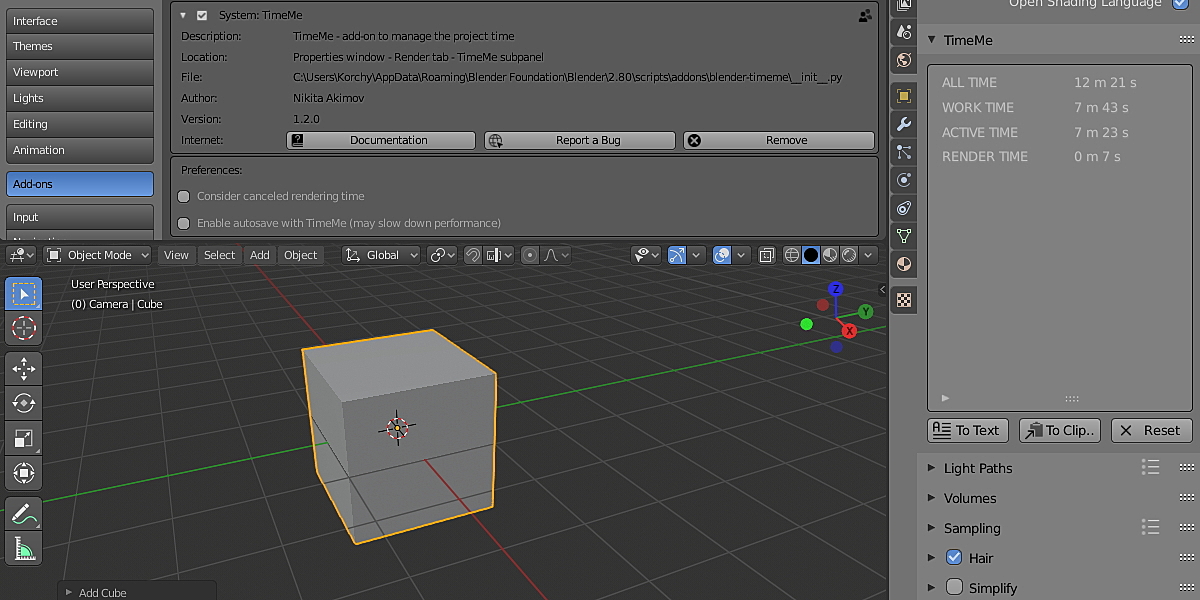
Timeme is a Blender add-on by Nikita Akimov that tracks time spent on a project. It runs in the background and starts automatically when you create a project or open an existing one. The add-on saves its statistics in the current .blend file, which can help freelancers and other Blender users keep a project-level time record.
Project time categories
Timeme keeps four time totals:
- All the time the project is open
- Work time
- Active time, while Blender's main window stays active
- Render time
Read and manage the totals
Use “To Text” to open the current statistics in a new text window, or “To Clipboard” to copy them. “Reset” returns the counted time to zero. Save the project before closing if you need to keep the latest statistics; the time recorded since the last save is lost if you close without saving.
Autosave and render options
The product listing notes that Blender's system autosave does not work while Timeme is running. To keep autosaving, enable “Enable autosave with TimeMe” in the add-on preferences. Another option lets you include canceled renders in the render-time total.
Check Blender compatibility
The marketplace listing names Blender 2.8, 2.81, 2.82, 2.83, 2.9, 2.91 and 2.92. Its documentation page describes the add-on as for Blender 2.8 and 2.9, and says earlier versions are not supported. The pages do not spell out the same version range, so confirm compatibility for your exact Blender release before installing.