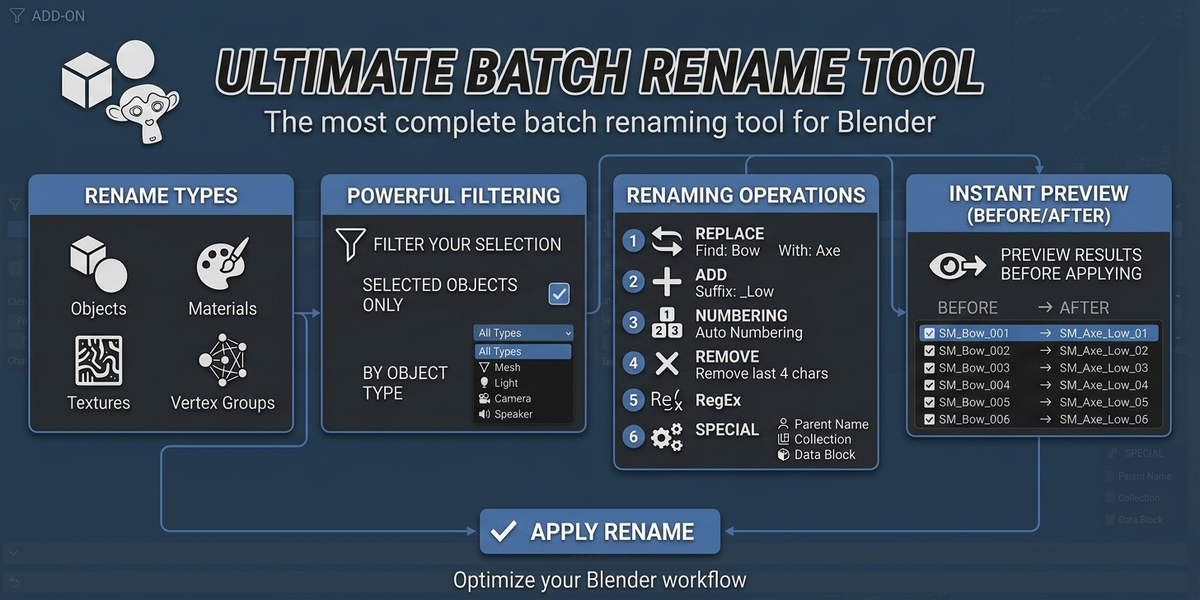
Ultimate Batch Rename Tool is a Blender add-on for applying naming changes across scene data in batches. It works with objects, materials, textures in image nodes, and vertex groups. You can narrow the selection with the Selected Only filter or an object-type filter, such as Mesh, Curve, Light, or Armature.
Combine eight naming operations
The tool's eight independent operations can be combined to build a naming pattern:
- Base Name: replace the existing names with a custom name for the selection.
- RegEx: apply regular expressions for more complex changes.
- Find & Replace: swap text, with optional case sensitivity.
- Remove & Trim: remove characters from the beginning, end, or specified ranges.
- Case Conversion: switch to uppercase, lowercase, Title_Case, or snake_case.
- Add Text: add a prefix or suffix, or insert text at a chosen position.
- Sequential Numbering: number items in decimal, hexadecimal, binary, or octal, with custom padding such as 001 and 002.
- Auto Date: insert today's date in a chosen format.
Preview changes before applying them
A live, side-by-side Before and After list shows the planned names before you apply changes. Status icons flag duplicates or errors, so you can inspect the proposed results first.
Presets and asset naming
Config Presets save and reload complete operation configurations inside a .blend file. For game and VFX workflows, Quick Suffix Presets provide one-click options for _low, _high for Substance Painter, and _UCX for Unreal Engine. Data Block Sync can also rename linked Mesh or Armature data when you rename objects. Parent & Collection can prepend a parent object's or collection's name to assets.
The product listing names asset preparation for Unity or Unreal, VFX scene organization, and architectural projects among its use cases. It lists Blender versions 4.0 through 5.0 and a GPL license. See the Superhive product listing for current details and the product documentation for further guidance.