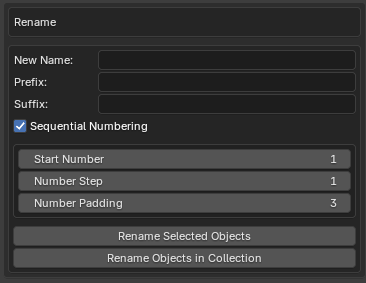
Rename Master is a Blender add-on for renaming objects from an interface in the 3D Viewport. It supports renaming selected objects or objects within a collection, with controls for base names, prefixes, suffixes, sequential numbering, and text replacement. See the product listing for its feature details.
Set names for selected objects or a collection
Choose a base name for selected objects or objects within a collection. Add a custom prefix or suffix when names need an extra label. For numbered names, Rename Master lets you set the starting number, the step between numbers, and the number padding used to keep digits consistent.
These controls suit batch naming when a group of objects needs a shared naming pattern.
Replace text in existing names
To change part of an existing name, enter the text to find and choose the scope. Replace Selected applies the change to selected objects; Replace All applies it to all objects in the scene. This is useful when the same text appears in several names and needs a consistent correction.
Install and check Blender compatibility
The Superhive listing names Blender 4.3 in its Blender Version field. It does not state compatibility with other Blender releases, so check the developer's listing or documentation if you use another version.
- Download the add-on ZIP file.
- In Blender, open Edit > Preferences and go to the Get Extensions tab.
- Open the Extensions Settings menu beside the Repositories dropdown and choose Install from disk.
- Select the ZIP file and press Install from disk. Wait for it to register, then restart Blender.
These steps come from the Rename Master installation documentation. The product is published by Valentin.