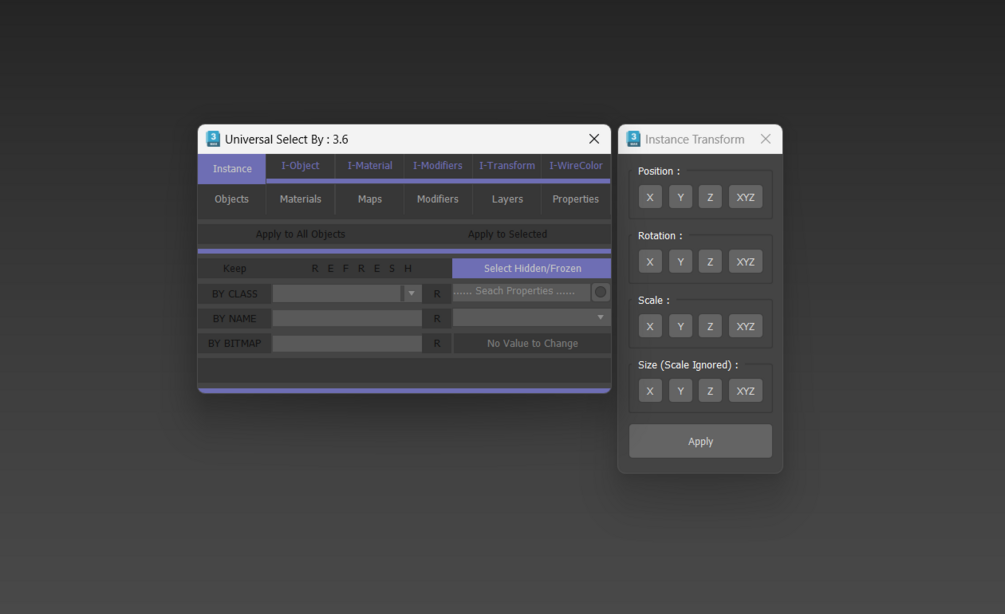
Universal Select By is a 3ds Max script for selecting objects and other scene data by type, instance relationship, class, name, bitmap name, or changed property. Its modes cover Objects, Materials, Maps, Modifiers, Layers, and Properties, with a separate Instance mode for related objects and scene elements.
Choose a selection mode
- Objects: Select by object criteria, including face count. Enter a number to find objects with more faces than that value, add
=to match the exact count, or add<to find objects with fewer faces. - Materials and Maps: Search or edit materials and maps, including bitmap searches by name. The version 3.6 listing notes that bitmap searches include the file extension.
- Modifiers and Layers: Select modifiers by class or name, and layers by layer name, when you need to find matching scene elements.
- Properties: Find objects whose default property has been changed. For example, searching for Renderable can select objects where that property is turned off.
In version 3.6, Instance mode covers instanced objects, materials, and modifiers, selection by wire color, and I-Transform selection by transform and local size. Class, name, and bitmap-name filters help narrow a search to the items you need.
Edit materials, maps, and names
In version 3.6, Material and Map modes have five operations under the [R] button: Remove, Replace, Replace with Sub, Replace As Sub, and Replace And Keep Subs. These options let you choose how the selected material or map is changed, including whether sub materials or maps are retained.
The script renames objects, materials, maps, and modifiers with prefixes or suffixes. Renaming objects, materials, and maps adds a number at the end; modifier renaming adds one only when Incr. is checked. The Graph function distributes values, while the Maps [M] function changes values using Map/Bitmap Color.
Version 3.6 details
Version 3.6 replaces I-Similar with I-Transform, which selects objects by transform and local size, and adds bitmap searches by name with the file extension. Version 3.5 changed the startup mode from Instance to Blank. Obaida's version 1.02+ notes list detection for the Slate and Compact Material Editors. The developer's Gumroad page and the ScriptSpot entry are useful places to check current release and distribution details.
Who may find it useful
Universal Select By fits 3ds Max work where selection criteria span several kinds of scene data. It can help when a task involves locating matching objects, changing a property state, filtering by face count, or applying a batch edit to materials, maps, modifiers, or names.