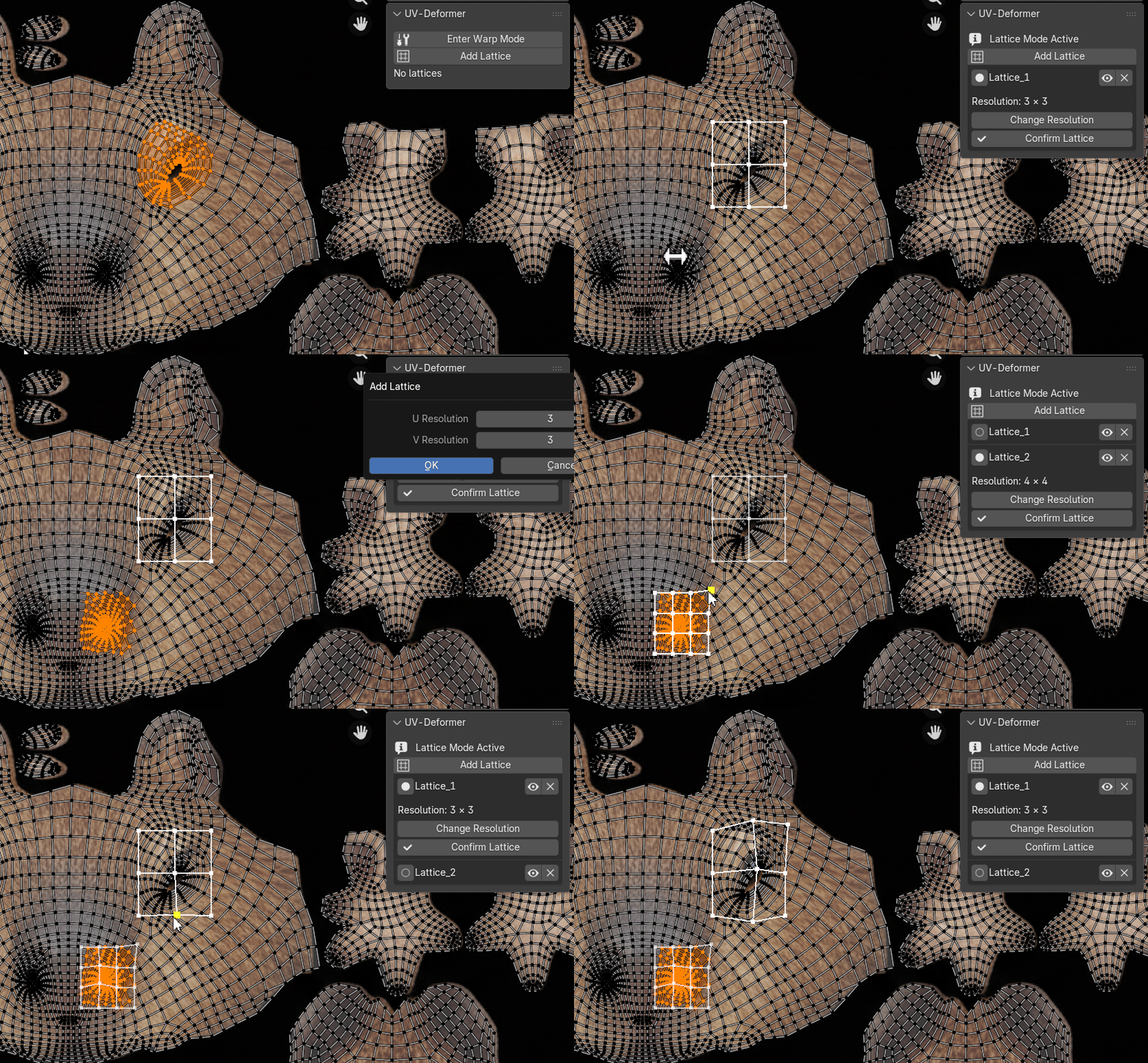
Uv Deformer is a Blender add-on for adjusting UV maps with lattice grids in the UV Editor. For a mesh object in Edit Mode, add a lattice around selected UV vertices, then move its control points to correct distortions or refine a texture layout. It supports multiple lattices on one mesh, with each lattice targeting a specific UV selection. The product listing identifies Blender 5.0 and a GPL license. See the Uv Deformer listing and its documentation for current product details and instructions.
Adjust UVs with lattice control points
When you add a lattice, it uses the bounding box of the currently selected UV vertices. You choose its horizontal U and vertical V resolution, from 2 to 10 divisions. The documented default is 3 for each direction. During Warp Mode, hovering over a control point and dragging it updates the UVs in real time using bilinear interpolation.
Ctrl-click toggles control points in a multi-selection. Dragging then moves the selected points together; with no points selected, dragging a point moves only that point. You can change the active lattice's resolution later. The add-on resamples its control points to preserve the existing deformation, then resets the point selection.
Manage and bake each lattice
The controls are in the UV Editor sidebar, under the Tool tab. From the panel, you can add lattices, choose which one is active, toggle its visibility, or delete it without baking. Enter Warp Mode to interact with the control points. Enter or Return exits the mode and keeps the changes; Esc exits the mode while leaving the lattices in place.
When a deformation is ready, use Confirm Lattice to bake it into the UVs. It removes that lattice from the list, so confirm lattices individually. Undo is supported. Right-click during a drag resets that drag to its original point positions. The product listing also notes restoration of original UVs on cancel; the documentation describes Esc specifically as exiting Warp Mode while preserving the lattices.
Installation and practical limits
The documentation names the download uvdeformer_v0_1.zip. In Blender, open Edit > Preferences > Add-ons, choose Install from disk, select the ZIP, and enable UV Deformer. Its panel should then appear in the UV Editor sidebar under Tool. The listing identifies Blender 5.0; the supplied material does not establish compatibility with other versions.
Uv Deformer works on mesh UVs in the UV Editor. It does not handle overlapping UVs automatically, so you need to manage overlaps and multiple lattices yourself. The documentation cautions that higher resolutions, such as 10 by 10, may slow real-time updates on large UV selections. It also says lattices are held in memory and reset when Blender restarts unless saved in a .blend file with the script run.