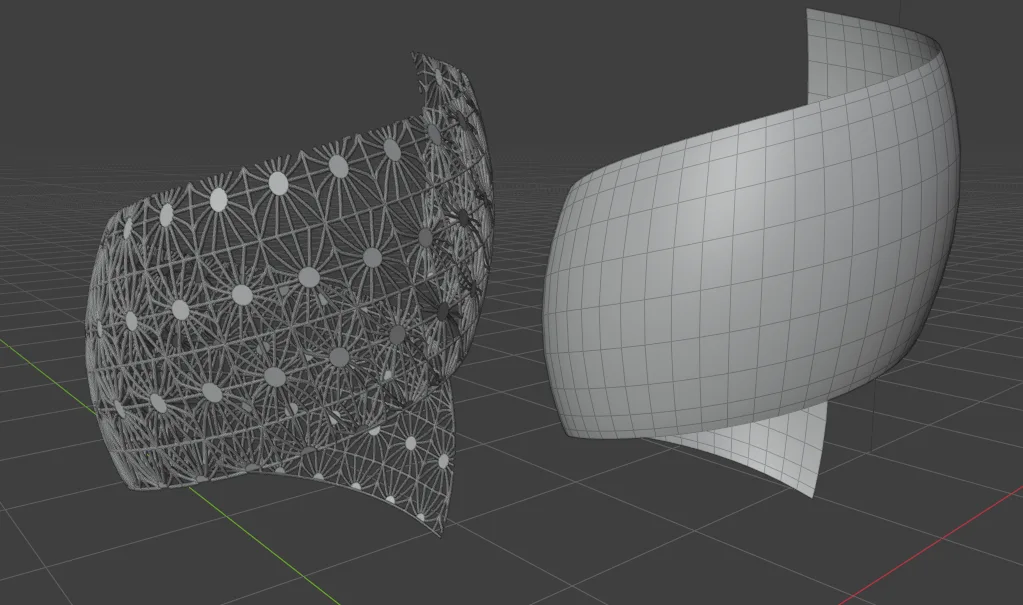
UV Surface Projector is a Blender add-on by Jackal for mapping selected curves and meshes onto a UV-mapped mesh surface. It treats the active object as the target, normalizes source coordinates into its UV space, then maps points back to positions on the target. This lets you place logos, engravings or decorative geometry on a model using its UV layout.
Set up the target and sources
Make the target mesh active and select one or more curves or meshes to project. The target needs a UV map, and at least one source object must be selected. In the 3D Viewport, open the N panel and choose UV Projector. Select Auto to use both curves and meshes, or choose Curve or Mesh to filter the sources. Configure the projection. If you enable Cut / Modify Source, duplicate important mesh sources before clicking Project / Cut because the option modifies mesh sources directly.
Fit the projection to the UV layout
Clip Outside UV removes source parts outside the target's UV islands when enabled. Keep Aspect Ratio preserves the source's original width-to-height ratio while fitting it into the UV area. Flip V reverses the V coordinate for cases where the source and target use different V orientations. Nearest Triangle finds the nearest UV triangle for points near island boundaries and can improve handling in those areas.
Edge Margin leaves distance between projected geometry and UV boundaries. Set it in UV units, as a percentage of the UV dimensions, or in millimeters. For the millimeter setting, the add-on estimates the corresponding UV distance from the target's dimensions. Turn the margin off to use the full available UV area.
Understand source changes and curve settings
Curves are converted into projected surface curves. Preserve Edges attempts to retain source topology and avoid unnecessary aggressive vertex welding.
Curve Samples sets the number of points used to convert Bezier curves for projection. The listed default is 150. More samples can improve accuracy, but create more points and slow processing. Bevel Depth controls curve thickness; a value of 0 adds no bevel thickness, while Bevel Resolution controls bevel smoothness.
Inspect and clear results
The UV Boundary button creates a flat, edges-only representation of the target's UV island boundaries, with no faces. It is stored in the UV_Flat_Comparison collection. Projected curve results go into UV_Projector_Results. Clear removes the generated UV boundary, and Clear Results removes generated projection results without deleting the original target.
The Blender Extensions listing identifies release 1.0.1, Blender 4.2.0 or later, and a GPL-3.0-or-later license. Check the listing for current release details.