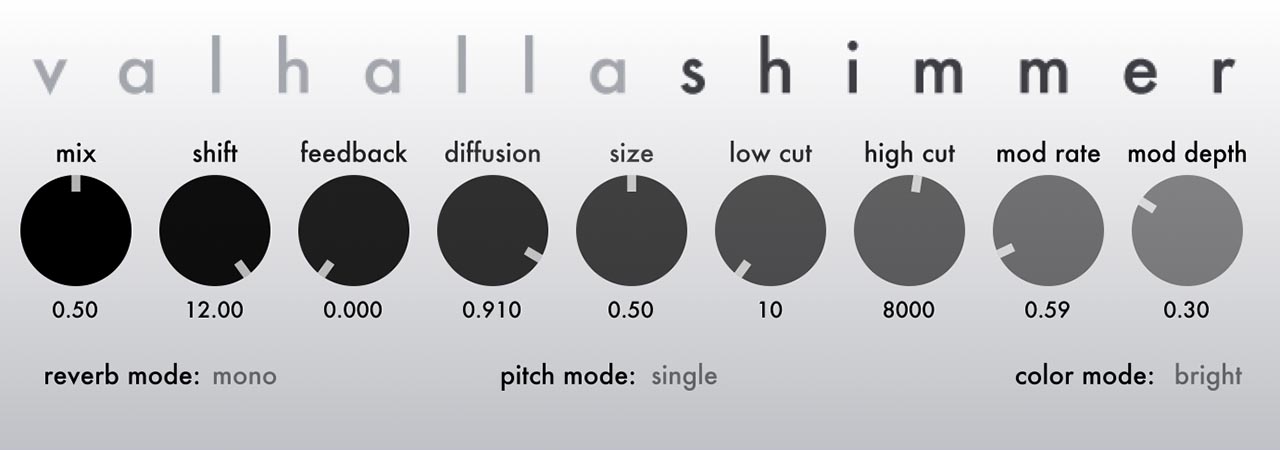
Valhalla Shimmer is an algorithmic reverb that feeds pitch-shifted signal back into its reverb network. Use it to shape anything from short, colored ambience to long, evolving tails and pitch-shifted pads. Set Pitch Mode to Bypass for conventional reverb, or choose one of its four pitch-shifting modes to add upward, downward, or reversed-grain movement to the decay.
How the modes shape the sound
The four Reverb Modes change the reverb's size, echo density, and modulation depth, and affect how quickly pitch-shifted feedback builds. Mono is mono-in and stereo-out, with a large base size and a slow fade-in suited to very large spaces. Big Stereo is stereo-in and stereo-out, with a large size and dense echoes for hall reverbs. Medium Stereo is stereo-in and stereo-out, with a smaller base size suited to halls and other moderately large spaces. Small Stereo suits short ambiences and room-like sounds, with lower echo density and more coloration.
The five Pitch Modes determine what happens inside the feedback loop. Single shifts the feedback up or down by the Pitch setting. Dual shifts it in both directions at once. SingleReverse and DualReverse reverse each grain before shifting it, producing smoother, more organ-like textures. Bypass leaves the feedback unshifted for more conventional reverb.
Practical starting points
Classic shimmer: Start with Medium Stereo or Big Stereo, set Pitch to +12 semitones, and set Feedback to at least 0.5 for the classic shimmer. Diffusion around 0.9 gives a quick, reverberant attack. Adjust Feedback to change the amount of pitched signal and Size to set the decay. Dark Color Mode rolls off more high frequencies. Keep modulation depth low at first because pitch shifting adds its own random modulation.
Blooming decay: Set Diffusion near 0.5 and raise Feedback, then use Reverb Mode and Size to adjust the attack. Medium Stereo has a fairly long attack at this setting; Big Stereo or Mono can make it much longer, while Small Stereo lacks the density for a Bloom-like sound. Diffusion around 0.5 to 0.618 produces a gradual fade-in; around 0.618, the attack and decay have similar lengths.
Shorter or less pitched effects: Small Stereo can make short, more colored ambiences. Choose Bypass to remove pitch shifting from the feedback loop. Shimmer has no dedicated pre-delay control; lowering Diffusion can slow the reverb attack and create more separation between the dry sound and the reverb.
For a similar decay, use a larger Size with lower Feedback, or higher Diffusion with less Feedback. Lowering Diffusion while raising Feedback can produce a similar reverb time with less metallic coloration. Valhalla says the sliders are smoothed to avoid clicks when changing or automating controls.
Compatibility and authorization
Valhalla's product page lists 64-bit VST2.4, VST3, and AAX versions for Windows 7, 8, 10, and 11. For Mac, it lists 64-bit VST2.4, VST3, AAX, and AU versions for Intel and Apple Silicon processors, with macOS support from 10.9 through Tahoe. Check that your DAW supports the format and operating system you use; Valhalla says it cannot guarantee combinations the DAW maker no longer supports.
Valhalla lists Shimmer at $50 USD. A purchase includes the available plugin formats for the DAWs you personally use, and Valhalla permits installation on computers you own and personally use. After purchase, the full installer and license keyfile are available through your Valhalla account. Save the keyfile and select it in the plugin's authorization dialog. Valhalla says Shimmer can be authorized and run on an offline workstation if you transfer the installer and keyfile to it.