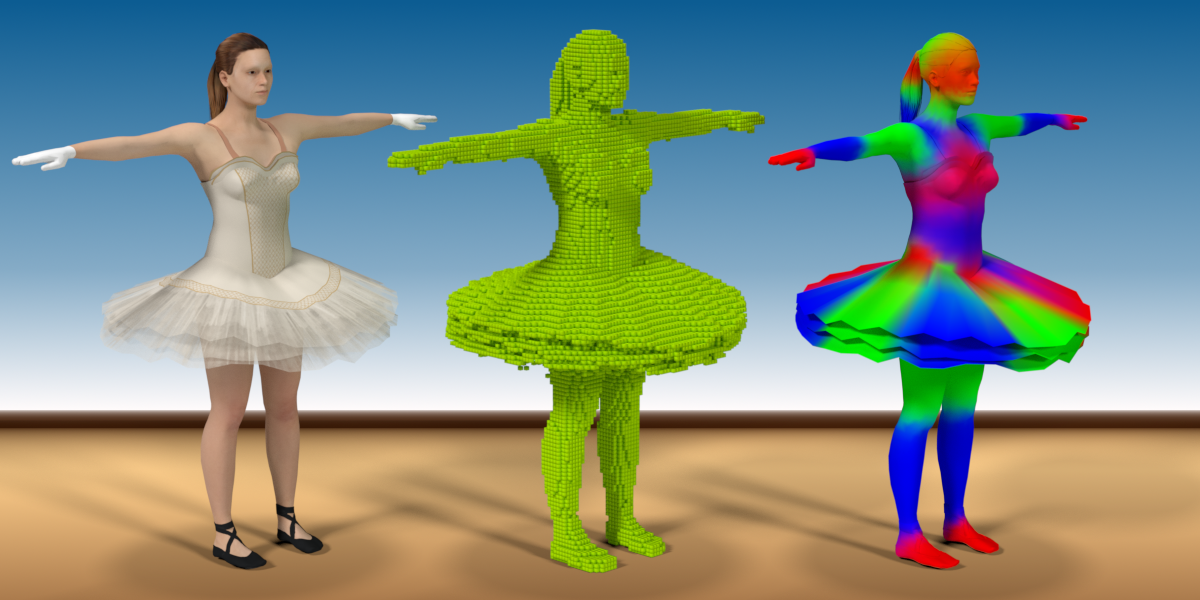
Voxel Heat Diffuse Skinning is a Blender add-on from Mesh Online for generating vertex weights on characters built from separate, non-seamless meshes. When Blender's built-in bone heat weighting fails to find a solution or leaves components unweighted, its voxel method converts the assembled character into a solid volume and diffuses bone influence through it. The package also includes iterative bone heat and an Auto Fusion workflow that combines both methods. See the Superhive product listing.
How Auto Fusion combines the methods
Auto Fusion runs two weighting passes. Iterative Bone Heat handles areas identified by mask-bone names, commonly the face, fingers, and toes. Adaptive Voxel Heat Diffuse Skinning then weights the other geometry, and Auto Fusion fuses the results. Presets are provided for Rigify and Auto-Rig Pro. For another rig, edit the mask-bone keywords to match its naming.
Select all of the character's sub-meshes and one armature before running the workflow. Version 5.1.1 adds a Phase 1 Meshes list for bone-heat weighting: an empty list includes all meshes in that pass, while only listed meshes receive bone heat when the list is populated; the others are voxel-only. For the intended two-pass split, list the meshes containing mask bones. The product's FAQ explains other setup details, including protecting selected vertex weights.
Adaptive resolution and its tradeoffs
Adaptive voxel resolution uses coarser cells inside the character and subdivides the surface in detailed areas. Subdivide Depth 1 doubles the surface resolution; depth 2 quadruples it. A smoothing step reduces jagged transitions between coarse and fine cells. Uniform high resolution takes longer and uses more memory; clothes, hair, or equipment may break into pieces in high-resolution mode.
In the developer-reported finger-weighting test on a Mac mini M4 Pro, adaptive Voxel Resolution 150 with Subdivide Depth 2 and Diffuse Falloff 0.8 finished in five seconds; the standard uniform grid at Voxel Resolution 600 with Subdivide Depth 0 and the same falloff took one minute and 57 seconds. Other parameters were at their defaults; these times describe that test setup, not guaranteed runtimes. The add-on uses multiple CPU cores, and its documentation recommends at least 8 GB of memory.
Workflow and included tools
For a quick setup, load the Rigify or Auto-Rig Pro mask preset, list the meshes containing mask bones in Phase 1 Meshes, select all character sub-meshes and the armature, then run Auto Fusion. In the professional workflow, first generate weights with Blender's automatic weighting, falling back to Iterative Bone Heat if it fails. Then select vertices whose existing weights should be protected, enable Protect Selected Vertex Weight, and run Adaptive Voxel Heat Diffuse Skinning. You can edit the generated weights afterward.
The package also includes a Joint Alignment Tool and Corrective Smooth Baker. Superhive lists Blender compatibility from 3.6 through 5.3. Its listing says the add-on's Python code is GPL and that the included command-line utility is not GPL, so review the applicable terms before redistributing either component. Check the product listing for current compatibility and release information.