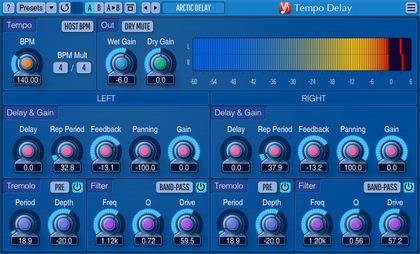
Voxengo Tempo Delay is a free stereo delay effect for music production. Its separate timing and panning controls let you shape ping-pong echoes, while built-in filtering and tremolo add ways to alter the repeats.
Set the timing and stereo movement
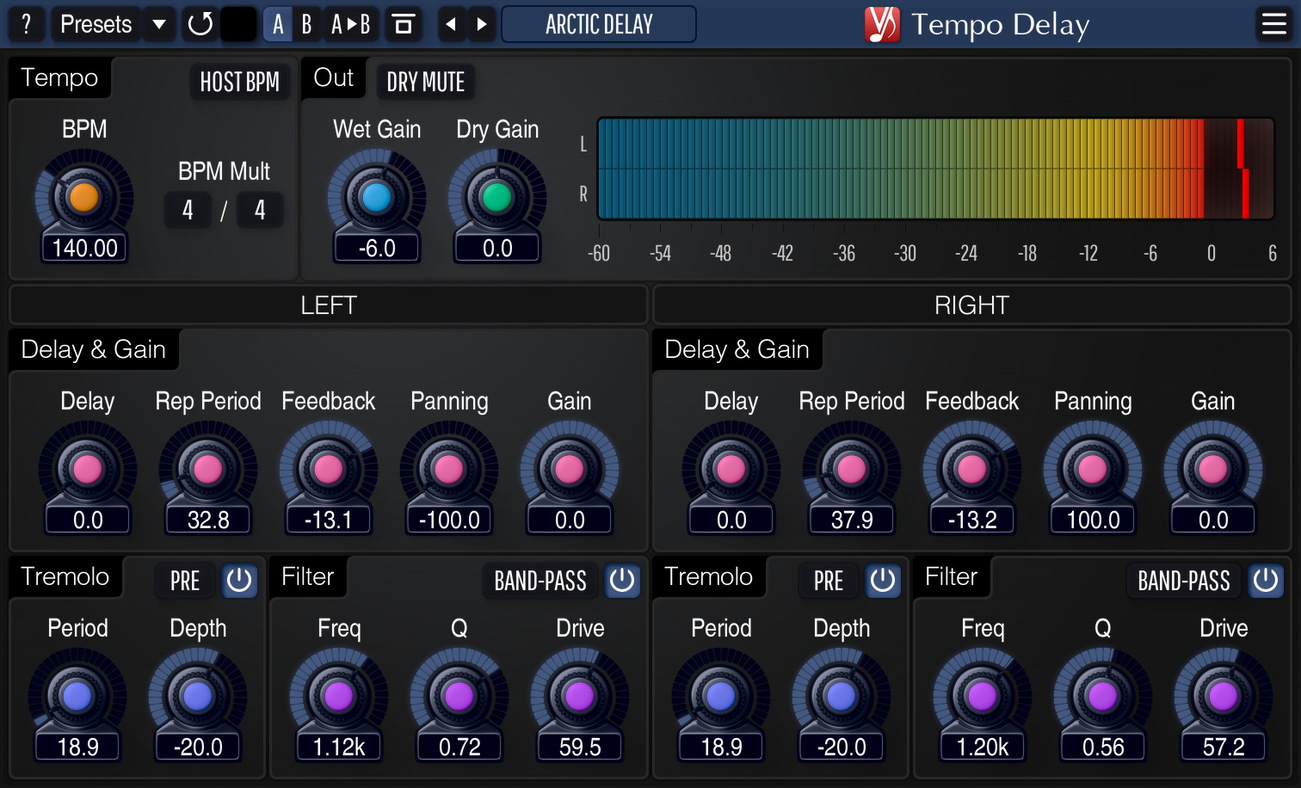
Use the BPM control to set the plugin's tempo, or switch on Host BPM to follow the DAW's master tempo. BPM Mult scales the base tempo with a numerator and denominator. Each channel has its own initial Delay and Rep Period, both set as percentages of the base tempo. Separate Feedback and Panning controls set each channel's repetition feedback and stereo position; Gain sets that channel's overall loudness.
This layout suits producers and mix engineers who want to place the first echo and later repeats independently across a stereo track. It can make evenly spaced ping-pong echoes without relying on one shared delay-length control.
Shape repeats with filter and tremolo
The filter is applied before each repetition. Choose a filter type, then adjust its frequency, Q and Drive. Q controls how steep the filter shape is, and Drive sets the filter's saturation amount.
Tremolo can run before a repetition is made or affect the channel's overall output after it. Its Period is tied to the base tempo, and Depth controls its amount. At the output, Wet Gain and Dry Gain balance the processed and original signals; Dry Mute silences the original signal. Tempo Delay also includes presets, undo and redo history, A/B comparisons, and zero processing latency.
Check host and system compatibility
Voxengo offers AU, AAX, VST and VST3 formats for Mac, and VST, VST3 and AAX formats for Windows. The plugin requires a compatible audio host; Voxengo lists Ableton Live, Cubase, Logic Pro, REAPER, Pro Tools, FL Studio and Studio One among its examples. Its compatibility information lists macOS 10.12 and later, Windows XP and later versions unless announced as unsupported, a 2.5 GHz dual-core or faster processor, and at least 4 GB of RAM. Voxengo also names native Apple Silicon support and macOS Sonoma, Sequoia and Tahoe. The Windows installer supports 32-bit and 64-bit audio hosts.
Voxengo lists Tempo Delay as free. Its setup notes say registration is not required and an internet connection is not needed for the installed plugin to run.