What WLock Lite does
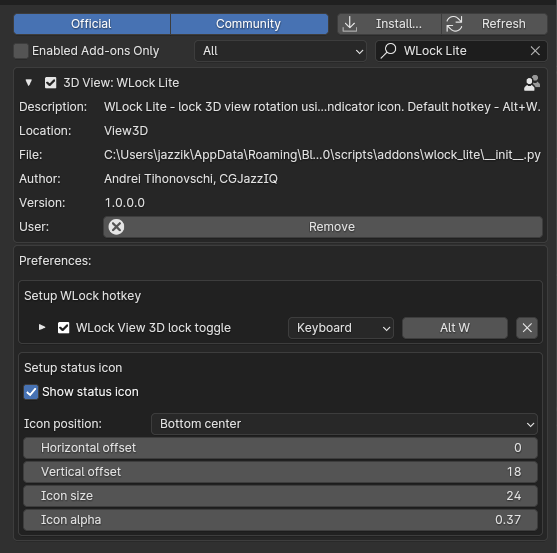
WLock Lite is a Blender add-on by CGjazziQ for locking rotation in the 3D View. Its default shortcut is Alt+W. A lock icon indicates the locked state; you can configure the icon or turn it off in Preferences.
Independent viewport controls
WLock Lite lets each open 3D view be locked or unlocked separately. You can keep rotation fixed in one view while leaving another available for orbiting. From a user camera view, press the shortcut combination a couple of times to lock rotation.
When it may help
The developer suggests 2D animation with orthogonal projection as one use. An accidental rotation can disrupt that view, so the lock helps preserve its orientation while you work. Sculpting is another suggested use. If your layout has several 3D views, their independent lock states let you protect one orientation without applying the same state to every view.
Blender compatibility and setup
The product overview and its documentation say Blender 2.8 to 4.0. A separate compatibility list on the listing includes releases through 4.2, including Blender 4.1 and 4.2. The listing and documentation do not reconcile whether Blender 4.1 or 4.2 is supported.
CGjazziQ lists the license as Royalty Free. Check the WLock Lite product listing and its documentation page for current compatibility and license details.