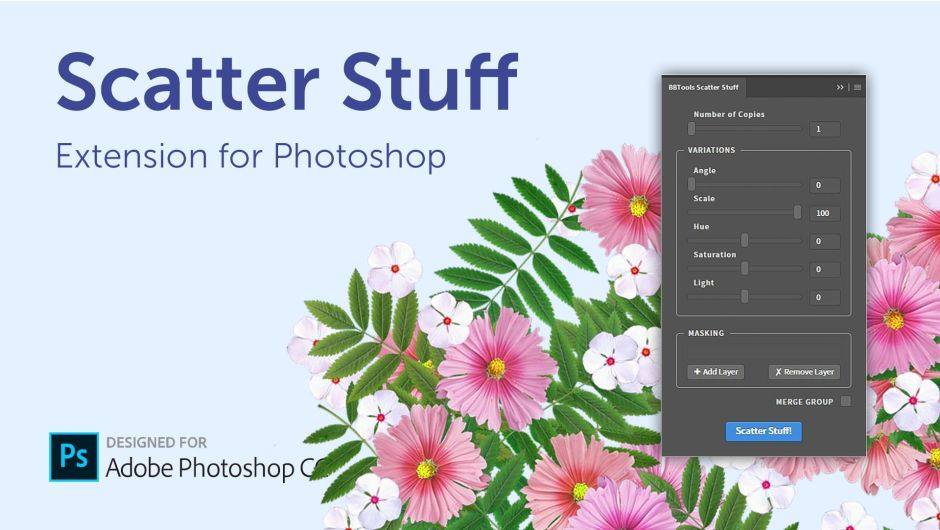
Scatter Stuff Photoshop Extension distributes one or more layers across a Photoshop document, a selection or a mask. Made by Bogdan Bogdanovic, it supports text layers, smart objects and regular layers, with controls for varying each copy’s angle, scale, hue, saturation and lightness.
Choose where layers are scattered
You can scatter layers across the document, within a selection, or with the Masking feature. Masking uses a layer the same dimensions as the document. The layer can be black and white, with gray values allowed; white areas indicate where the extension should place scattered layers.
Adjust each copy
The panel includes a copy count and controls for angle, scale, hue, saturation and lightness. Hue can vary from -180 to +180, while saturation and lightness can each vary from -100 to +100. Setting one of those color controls to 0 leaves that property unchanged. Scale uses 100% as the full-size reference; the listing describes variation from 100% down to a selected lower value.
The version history for 1.1.1, dated April 9, 2026, describes separate minimum and maximum angle values and a -180 to +180 degree range, allowing rotation in either direction.
Manage larger scattering runs
The Merge group option combines the scattered layers into a group. The product listing says this can speed up scattering when Masking is in use. For a 500-copy job, its suggested approach is to create 50 copies at a time, merge the group, then repeat until you have completed ten runs. Treat that as the vendor’s workflow tip; the listing does not provide a performance benchmark.
Check the listed Photoshop versions
The compatibility section names Photoshop 2024, 2023, 2022, 2021 and 2020, plus CC 2019, CC 2018 and CC 2017. It does not confirm later Photoshop releases. The product listing has the source description, version history and compatibility details.
This extension fits a layer-based workflow where repeated elements need varied placement or appearance. Before using it in a newer Photoshop release, check the current vendor listing or ask the author about compatibility.