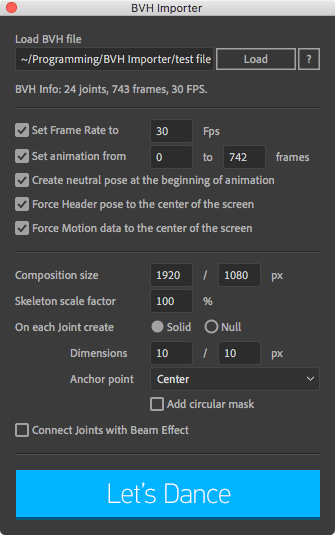
BVH Importer reads only Biovision BVH files containing a joint hierarchy and motion-capture data, then converts them into a solid/null-based skeleton animation for After Effects. It suits AE users who want to bring motion-capture movement into a composition as a starting point for animating or rigging an avatar or articulated figure.
Rotation and skeleton options
The importer supports standard ZXY Euler rotations and mixed joint rotation orders, including XYZ, XZY, and YXZ. Its file-compatibility check reports errors in a BVH file, which is useful when checking a new file before building a workflow around it.
For rigging, you can set the skeleton in a rest position even when the BVH file has no neutral pose. Motion data does not deform the skeleton at the beginning of the animation. Another option centers the skeleton in the composition instead of keeping offsets from the BVH file.
Import workflow
- Import a Biovision BVH file and run the compatibility check when using that file for the first time.
- Set the frame rate, duration, and animation range. Enable a rest pose if you plan to rig the skeleton.
- Set composition parameters and geometry options.
- Apply After Effects' Beam Effect to draw visible lines between joints.
The product page's compatibility list names After Effects 2022 and earlier releases down to CS3. It does not establish compatibility with later AE versions, so confirm your version before purchasing. The listed free trial is limited to 50 animation frames. The EULA permits one installed copy on one computer per license, plus one archival copy on a non-hard-drive medium solely for reinstallation; multiple installations or users require appropriate licensing for each user and copy.