Blender Edge Groups Addon gives Blender modelers a set-style way to organize mesh edges across any number of objects. Each group can hold an edge weight for bevel and crease work, and can track sharp or seam marks. Michael Jared says he built the add-on to organize his own bevel, subdivision, and edge-marking workflow. See the product listing.
Organize and select edges
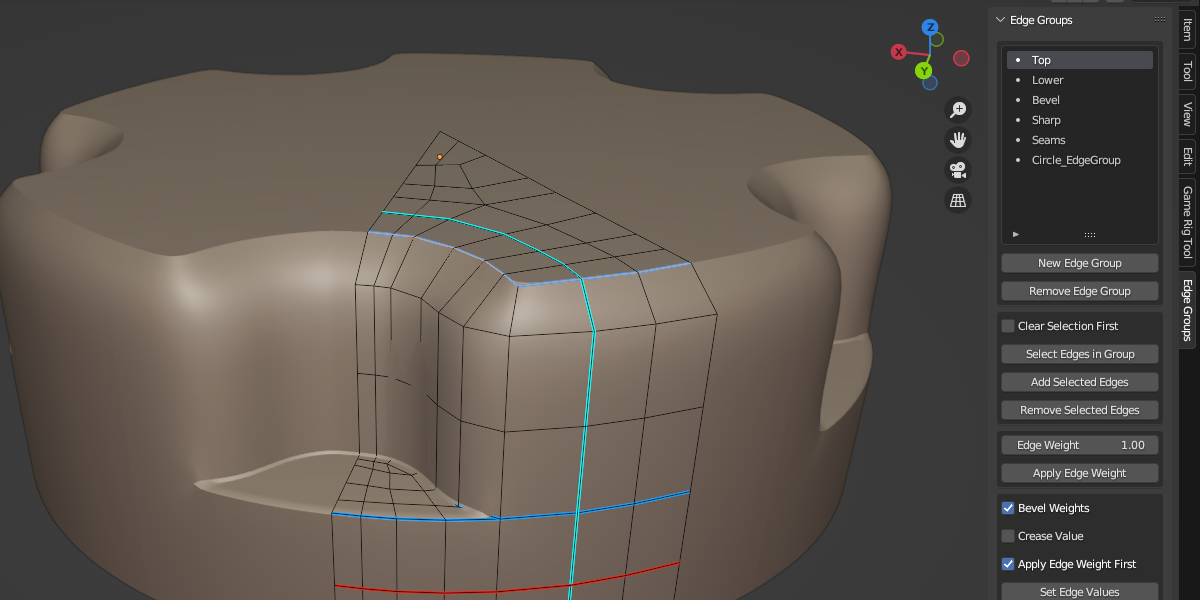
Create, remove, or rename groups, then make one active. The Selection panel lets you select its edges, add currently selected edges to the group, or remove them. With "Clear Selection First" enabled, each group is selected independently; otherwise, selections can compound. The documentation says the actions for selecting a group's edges, applying its weight, setting edge values, and marking or clearing edges are available in Object or Edit mode.
Apply weights and marks
The documentation distinguishes assigning an edge weight to a group from setting mesh values: applying a group weight alone does not necessarily change bevel weights or crease values. Use Set Edge Values to apply the group weight to either or both. Enable "Apply Edge Weight First" to have that step happen automatically. The active group can also toggle sharp and seam marks or clear them.
Version and license
The marketplace listing identifies version 1.2, lists Blender 3.6 and 4.0, and names the MIT license. Its May 18, 2024 changelog says version 1.2 handles Blender 3.6 and Blender 4.0.2 onward, including 4.0.2. That update addresses bevel weights and creases moving to attribute data; the add-on's interface did not change. Check the developer listing for current release and compatibility details.