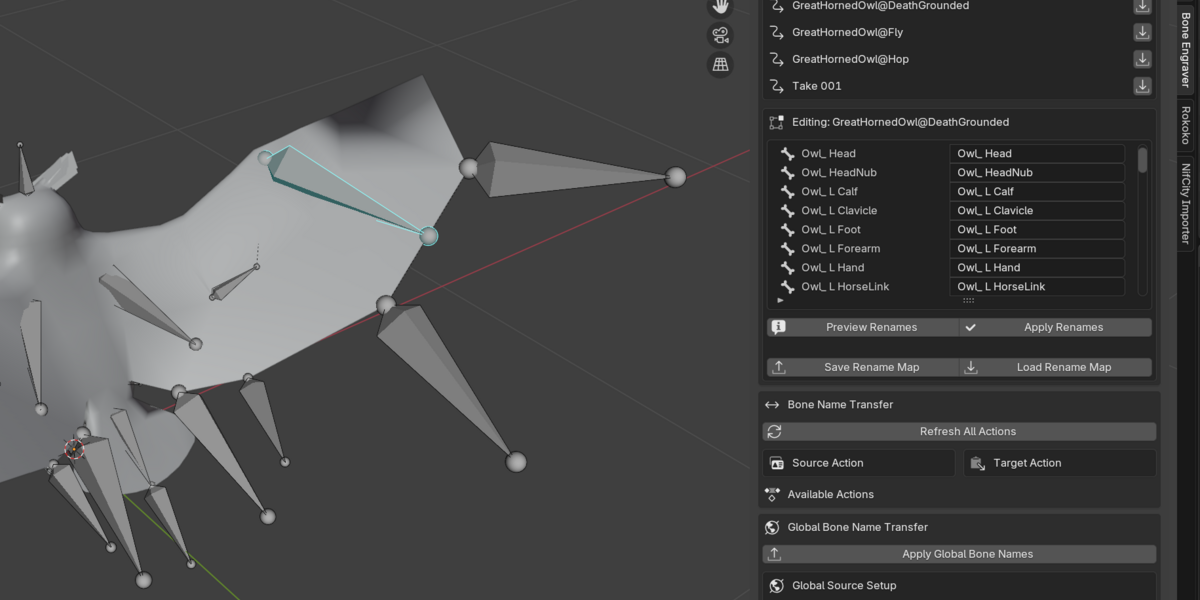
Bone Engraver is a Blender add-on that groups bone renaming, armature reordering, and bone matrix tools under a tab in Blender’s N-Panel. It is aimed at riggers, technical animators, and pipeline developers who work with imported assets, animation data, or export workflows that depend on consistent bone names and order.
The tools address different stages of rig work. Rename utilities keep names and animation references aligned, the reorder interface changes a rig’s internal bone order, and the matrix tools capture or adjust bone transforms. The Superhive product listing includes feature details and demonstration videos.
Rename bones across actions and rigs
Bone Renamer lets you create a name mapping for bones in the active armature and apply it to one armature or across multiple actions and rigs. Global Rename runs across all actions in the Blender file. Bone Name Transfer copies names from another armature or an action when the rigs have matching likeness and the same rig structure.
Auto Sync Bone Rename is a switch for ongoing edits. With it enabled, renaming through the properties panel or the F2 shortcut is mirrored across Actions, Drivers, and NLA tracks, and the tool keeps a history of changes. The renaming tools can update driver and constraint bone references when applicable, rename bone keys across animations, and update F-Curve references scene-wide. They also handle interlinked strips, including stashed actions, NLA tracks, and linked duplicates. See the Bone Renamer demonstration.
Reorder bones in an armature
The Bone Reorder Tool provides an outliner-style hierarchy viewer and a controlled export and import workflow for manually changing bone order in an armature data-block. Bone order can matter when an export pipeline or game engine depends on bone indices. Blender stores bones in a fixed internal list, and changing that order can affect export behavior, parenting logic, and animation data consistency. This makes the tool relevant when cleaning up imported FBX rigs or matching an established order used by another part of a pipeline. A Bone Reorder demonstration shows the interface.
Work with bone transformation matrices
Bone Matrix Mapper captures, analyzes, remaps, and restores bone transformation matrices. Its listed uses include FBX imports, pose correction, and animation transfer where bone transforms need to be preserved or restored. Fix Pose is available for a single armature or multiple selected actions. The listing warns that changing bone orientation on the armature alone can break animations connected to it; process the related animations along with the armature. The multi-action option is intended for this broader case, while the single option fits an armature with one animation.
Restore Pose Single (FBX) returns the armature’s Edit Mode rest-pose bone matrices to the backup saved before reorientation; Restore Pose Multi (FBX) batch-restores selected actions to the backup saved before reorientation. A separate processor can adapt a new animation made with the armature in its fixed position to the armature’s original orientation. For that operation, the armature must start in the fixed position. The Bone Matrix Mapper demonstration covers this toolset.
Fit and compatibility
Bone Engraver may suit Blender workflows that need coordinated renaming across animation data, deliberate bone ordering for export, or matrix correction for imported rigs. These tools change rig and animation data, so review the intended actions and preserve a project copy before applying orientation or ordering changes to production files.
The supplied Superhive listing reports compatibility with Blender versions 3.0 to 4.4. Check the current product listing for compatibility details before installing it in a newer Blender release.