Bpm Marker Toolkit by AL3K is a Blender add-on for placing timeline markers and F-Curve keyframes at beat intervals. In the Dopesheet editor's sidebar, enter a tempo, number of bars, and beats per bar to create positions without calculating each frame by hand. The panel is available from the N-Panel's BPM tab.
Set a tempo and frame range
The guide lists a BPM input range of 1 to 3000, with buttons to double or halve the current value. Set the number of bars and beats per bar, then choose a start frame. Auto Calculate End is enabled by default and derives the end frame from those rhythm settings. Turn it off to enter a manual end frame; generation stops at that frame, even if it cuts off the selected number of bars. A frame offset shifts each calculated marker or keyframe by the number of frames you specify.
Name markers and manage existing timing
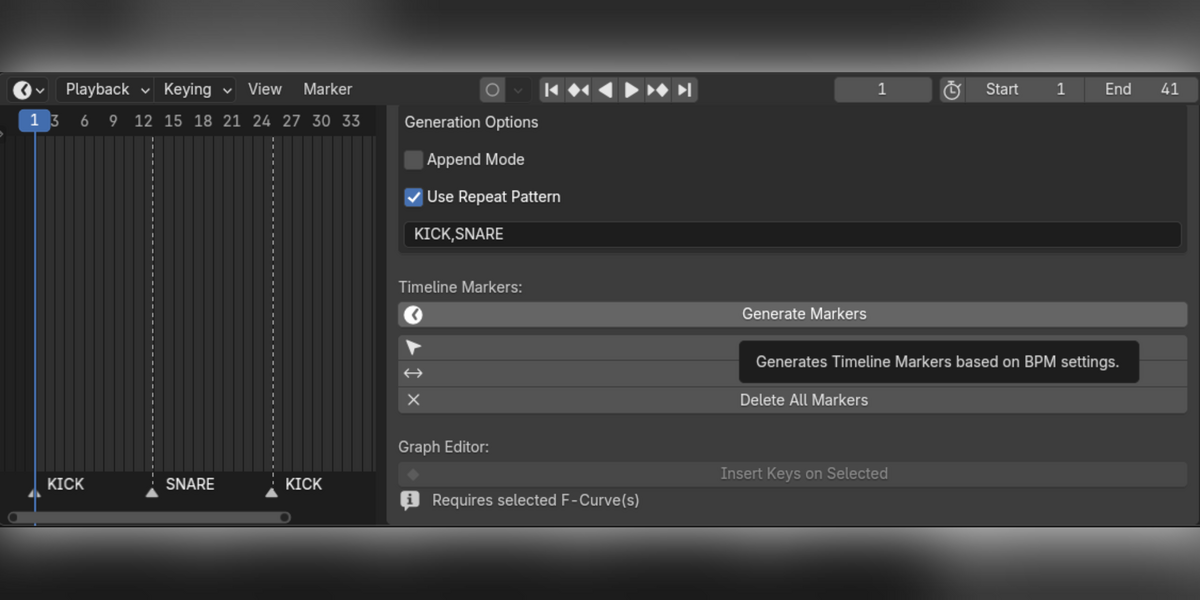
Markers can use Bar.Beat labels such as 1.1 and 1.2, or cycle through a comma-separated pattern such as Kick, Snare, HiHat. With Append Mode on, new markers or keys are added alongside existing ones. It is off by default; in that setting, generation clears existing markers or keys in the generation range, including the frame offset before adding the new set. For key insertion, clearing applies to the selected F-Curves.
The marker operators can select markers within a frame range, move selected markers by an offset, or delete every marker in the current scene. Delete All Markers applies to the whole scene, regardless of selection or range.
Insert keys on selected F-Curves
In the Graph Editor, select the curves to edit and use Insert Keys on Selected. The add-on places keys at the beat positions and evaluates each curve at that frame to set the key's value. It requires an active object with animation data and at least one selected F-Curve. After insertion, you may still need to adjust handles or interpolation to shape the motion.
Installation and compatibility
The product guide describes installing the downloaded ZIP through Blender Preferences, enabling “Animation: Ultimate BPM Marker Toolkit,” then opening the Dopesheet sidebar and its BPM tab. The Superhive listing records Blender 5.0, while the installation guide recommends Blender 4.0 or newer. Check the current listing and guide for compatibility details before installing.
The controls suit music visualizations, character animation timed to a soundtrack, motion graphics, VJ loops, and sound-effect timing. The tool sets beat-based positions; the Graph Editor remains available for refining how the animation moves between keys.