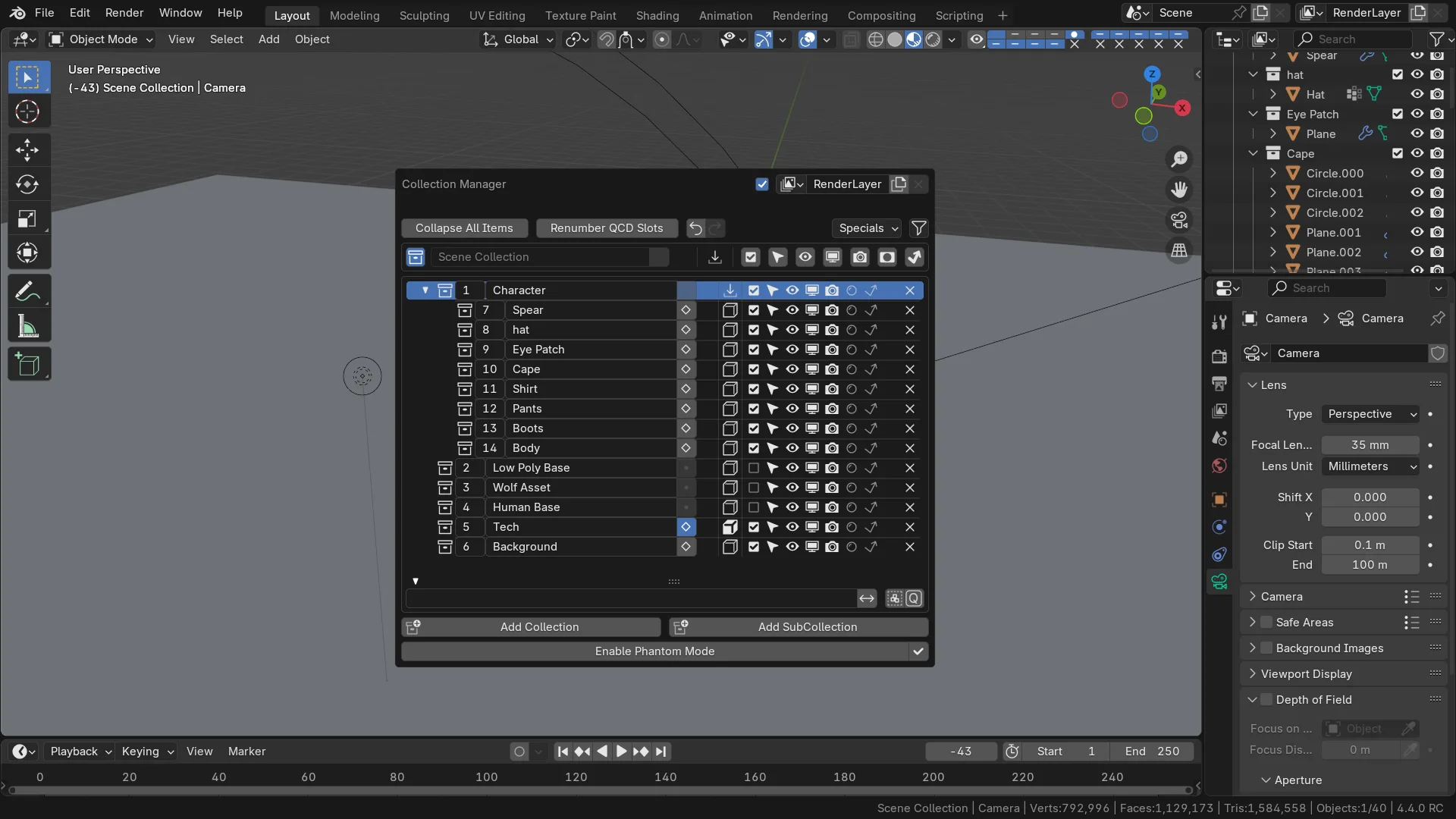
Collection Manager is a Blender add-on for managing collections and the objects assigned to them. Its main interface is a pop-up in the 3D Viewport. Version 2.24.12 requires Blender 4.2.0 or newer. In Object Mode, press M to open it, or use Object > Collection. The pop-up combines the scene's collection tree with controls for object selection, collection membership, restriction states, and Quick Content Display (QCD) slots.
Manage collections and object membership
The tree shows collections in the current scene. Expand or collapse branches, filter by collection name, or show collections that contain selected objects. Selection controls can select objects in a collection and, with modifier clicks, include its subcollections. The send controls move selected objects into a collection or add and remove them with Shift-click.
You can also set the active collection, add collections or subcollections, rename collections, and remove empty ones. The Select All Cumulative Objects command identifies objects that belong to more than one collection. These controls are documented in the Blender Manual.
Use QCD and collection restrictions
When QCD is enabled in the add-on preferences, Collection Manager shows slot controls and can filter the tree to collections assigned to QCD slots. The interface also provides restriction toggles for individual collections and global controls that act across collections, including options to invert or isolate restriction states.
Preview restriction changes with Phantom Mode
Phantom Mode saves the current restriction state while you make temporary changes. Disable the mode to restore the saved state and discard those edits. Use Apply Phantom Mode to keep the changes and exit. While Phantom Mode is active, the manual says that only restriction controls can be edited.
Version and Blender compatibility
The Blender Extensions listing identifies Imaginer as the developer and lists version 2.24.12. The version history says this release fixes error messages that were not shown after an invalid action. Check the listing for current compatibility and release details before installing.