Exact Decimate: Triangle Count Precision is a Blender add-on by Corey Kinard. It lets you enter a triangle-count target for a mesh instead of adjusting a decimation ratio to reach a target count. The product listing says the result may match the target or fall below it, depending on the starting mesh.
Set a triangle-count target
- Install and enable the add-on in Blender Preferences.
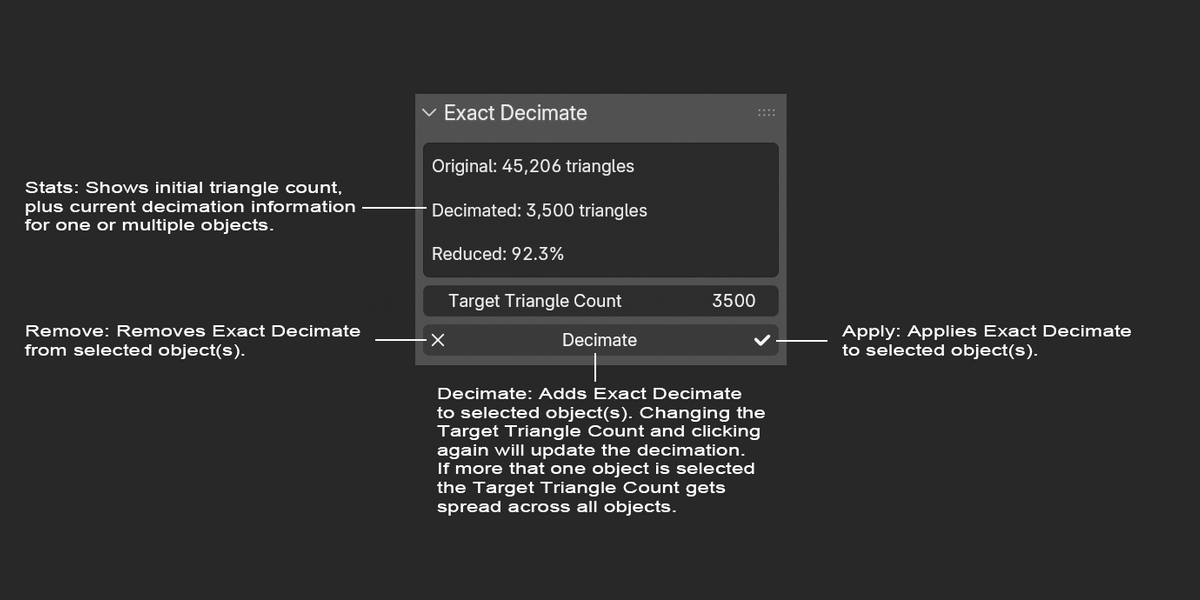
- Select one or more objects, then find Exact Decimate in the Tool tab's nPanel.
- Enter the target triangle count and click Decimate. To revise the result, change the target and run Decimate again.
- When you are ready to keep the result, click the check next to Decimate to apply the modifier. Click the X beside it to remove the modifier.
Processing time on large meshes
Exact Decimate uses Blender's Decimate modifier and inherits its limitations. Processing time depends on your system. The developer gives a high-resolution hair model as an example that could take around ten minutes. Blender also reruns the process when you apply the modifier.
For a further reduction, the developer suggests first decimating to a more manageable count, such as one million triangles or fewer, applying that result, and using it as the starting point for another reduction.
Version and setup details
The listing identifies version 1.7 and Blender compatibility from 4.0 through 5.0. See the setup documentation for the install steps and modifier controls, and the product listing for current compatibility details.