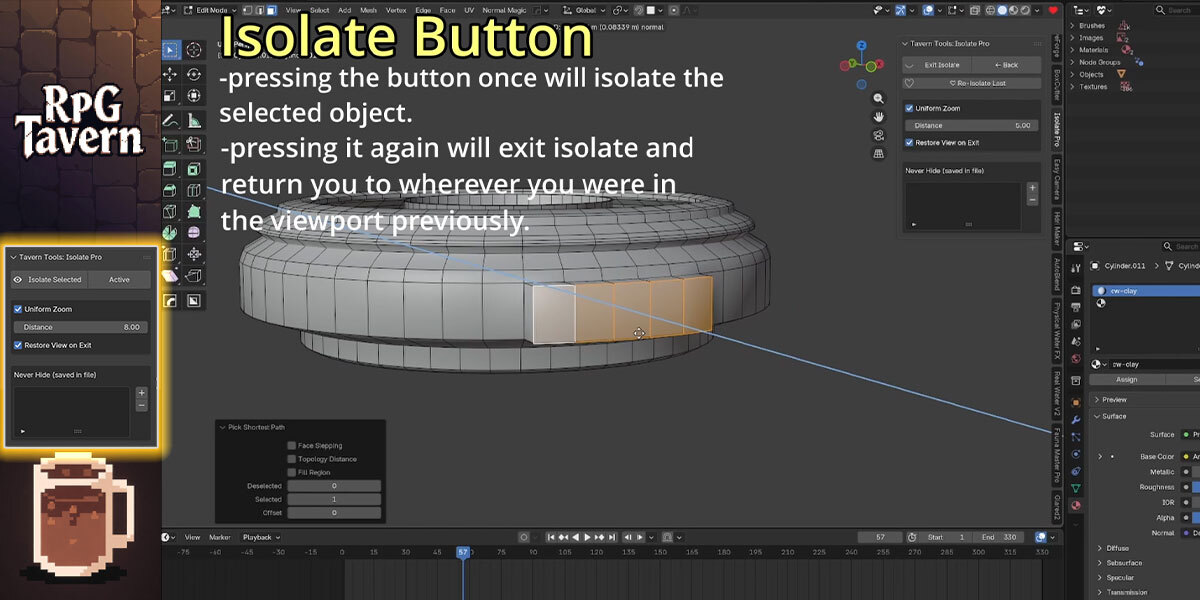
Isolate Pro is a Blender add-on from RPG Tavern for working on selected objects without manually hiding the rest of a scene or searching through the Outliner. It zooms in on the selection, lets you keep chosen objects visible, and returns to your previous scene view when you exit isolation.
Work on a selection and restore your view
Use Isolate to focus the viewport on one object or a group of selected objects. When you exit, Isolate Pro returns to the view you had before starting, which helps when moving between a detailed object and the wider scene.
The Active button preserves your selection when you adjust the active object. Your selection also remains intact as you toggle isolation on and off.
Keep reference objects visible
The collection-aware Never Hide system lets you add or remove objects that should stay visible during isolation. This is useful for reference geometry, light blocking, or a scale reference that you need beside the object you are editing.
Open the commands from Quick Favorites
Right-click Isolate and Exit Isolate to add those commands to Blender's Quick Favorites menu. You can then use the Q menu while the add-on panel is hidden, without reopening the panel to enter or leave isolation.
Installation and compatibility
The Isolate Pro documentation describes two installation options: use Edit, Preferences, Add-ons, then Install from Disk, or drag Isolate Pro into the scene. The RPG Tavern product listing lists Blender versions 4.5 through 5.0, Cycles and Eevee, and a GPL license. Check the listing and documentation for details that apply to your Blender setup.
Isolate Pro is suited to modeling, lighting, and layout work in scenes where temporarily hiding other objects would interrupt the task.