Jremesh Tools is a Blender add-on for rebuilding existing meshes as quad-based topology. It offers two routes: Instant Meshes, an external remesher that must be downloaded separately and referenced by the add-on, and QuadriFlow, which uses Blender's internal implementation. Remeshing creates a new object while keeping the original mesh in the scene, hidden.
Choose a remeshing method
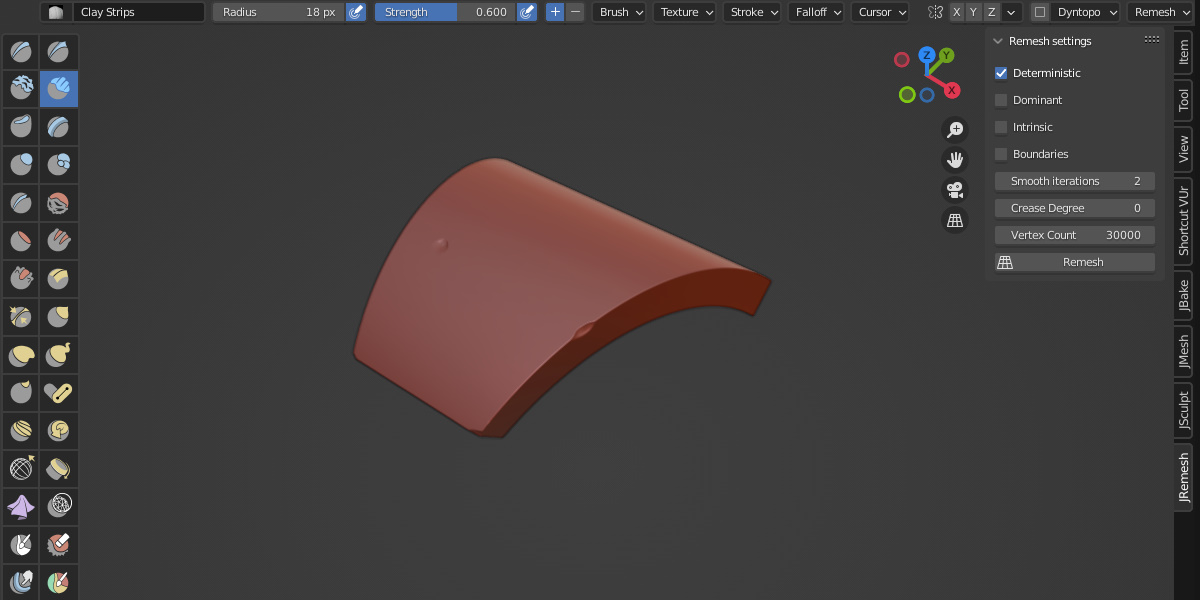
Use the Instant Meshes route when you want its remeshing options. The product information lists controls for desired vertex count, smoothing, boundary alignment and crease handling. It also names Deterministic, Dominant and Intrinsic modes. Since Instant Meshes is a separate tool, this route requires additional setup.
QuadriFlow is the in-Blender alternative. It uses Blender's internal QuadriFlow implementation, so you can choose it when you want a remeshing method that does not depend on a separately downloaded Instant Meshes executable.
Keep the source mesh while you work
You can compare the new topology with the source and return to the original geometry if the remesh does not suit the next step.
The quad-based result can be used as a cleaner base for further editing or as preparation for Multiresolution sculpting. Inspect the generated mesh before using it in later work, especially when its topology needs to meet specific modeling requirements.
Where Jremesh Tools fits
Jremesh Tools can rebuild complex topology, prepare hard-surface models for sculpting and create a base mesh for further editing. Its quad-based result can start an automatic retopology workflow; the available product information does not establish that Jremesh Tools performs the full process.
Blender compatibility and license
The Superhive product listing lists Blender 2.8 to 5.2, while the AnyPlugins summary lists Blender 2.8 to 5.0. Check the current product listing for the Blender release you use because the published ranges differ. Superhive identifies the add-on's license as GNU GPL and says its source code is available upon request.