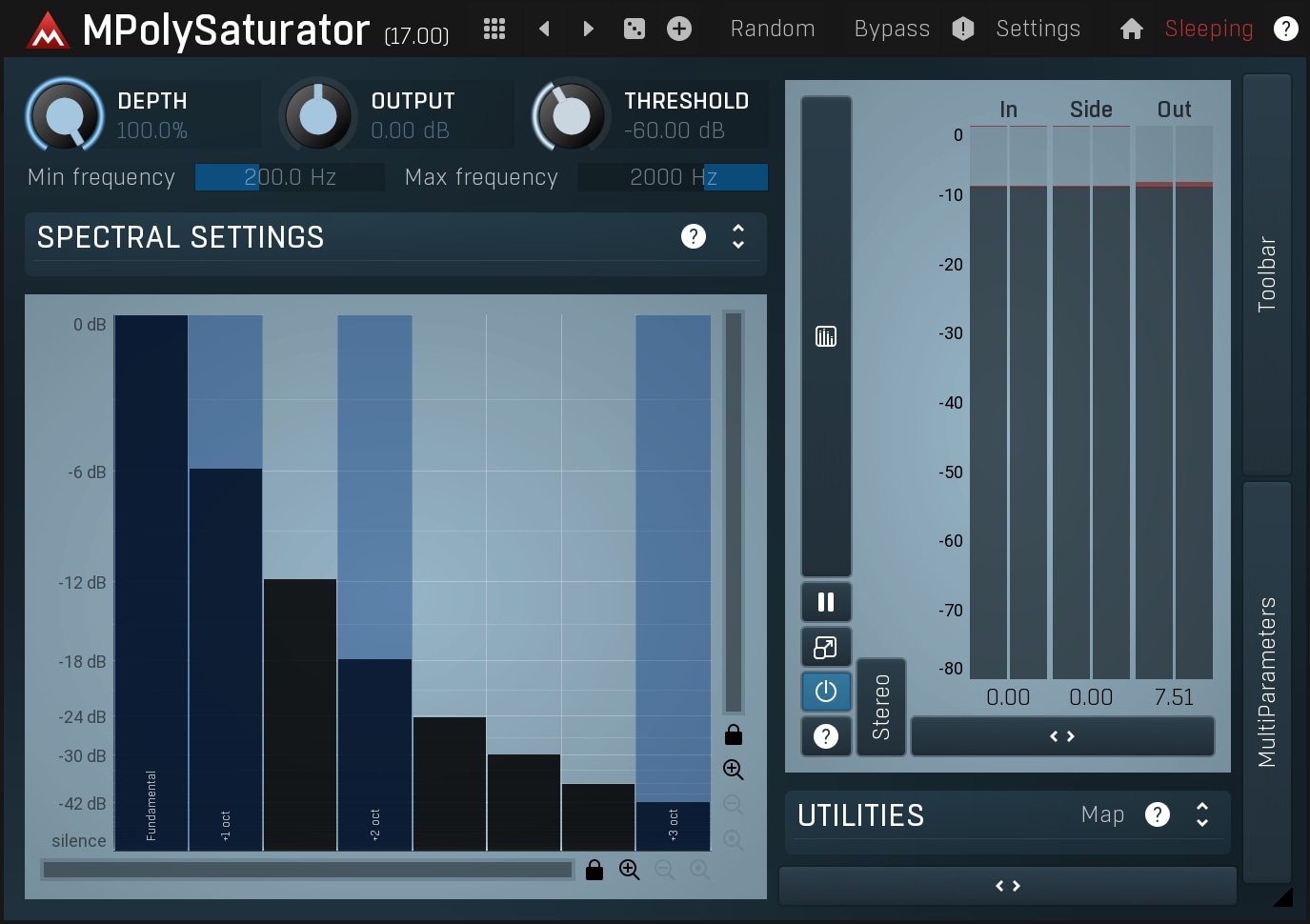
MPolySaturator is MeldaProduction’s spectral saturation plugin. It analyzes incoming audio in the frequency domain and generates harmonics for its component frequencies. Use it when you want to add harmonic content while controlling which frequencies are processed and how the generated harmonics are balanced. The product manual describes its controls and channel modes.
Shape the added harmonics
Depth controls the amount of added signal. Threshold sets the minimum level a frequency must reach before the plugin generates harmonics for it, while Min frequency and Max frequency limit the range of frequencies that can generate harmonics. In the synthesis graph, you can adjust the level of each synthesized harmonic for each frequency in the input. That lets you limit harmonic enhancement by frequency and level when a broad saturation treatment adds more than you want.
Make harmonic levels respond to the audio
Assigning a modulator to selected harmonics lets their levels follow the input or change over time. MPolySaturator includes four modulators that can work as LFOs, level followers, MIDI or audio-triggered envelopes, randomizers, or pitch detectors. They can also use a sidechain input.
Automatic gain compensation helps compare settings at a similar loudness. Its 400 ms response can cause slight distortion. A separate safety limiter can keep peaks below 0 dB. It alters the output and uses extra processing, so the manual advises against enabling it just in case.
Account for spectral latency and channel options
Spectral processing works in blocks, so MPolySaturator adds latency. The buffer-size control ranges from 256 to 16,384 samples, with 2,048 as the documented default. These values are assigned only for sample rates around 44-48 kHz; at higher rates the engine may readjust the buffer to produce similar audio results. Larger buffers can increase detail, latency, and CPU use; the manual also warns that a setting that is too high can create a time-smeared sound. Check this setting for live playing or material where transient timing matters. Lower resolution uses more CPU but preserves more time-domain characteristics.
The plugin supports mono and stereo, separate left and right processing, mid/side modes, surround up to eight channels, and ambisonics up to 64 channels. Access to surround and ambisonics depends on host support and setup. For VST2, surround requires global activation and a host restart. VST3, AU and AAX do not need that activation. Ambisonics requires a separate global activation and host restart.
Check compatibility and licensing
MeldaProduction lists Windows 10 or 11 (64-bit), with VST, VST3, or AAX hosts and an Intel or AMD processor with SSE2 support. On macOS 10.14 or newer (64-bit), it lists VST, VST3, AU, and AAX hosts and Intel, AMD, or Apple Silicon CPUs. MeldaProduction identifies these as minimum requirements and says the plugins may still work below them; it recommends checking in the trial period. Linux is not directly supported; the developer says use through Wine may be possible, with Microsoft TrueType fonts installed in Wine’s Windows fonts directory. See the support page for system requirements and installation resources.
Activation uses a personal license file. MeldaProduction says no dongle or internet connection is required for activation, and the license can be used on all of your computers while you remain the user. The product page also says purchases include free updates.