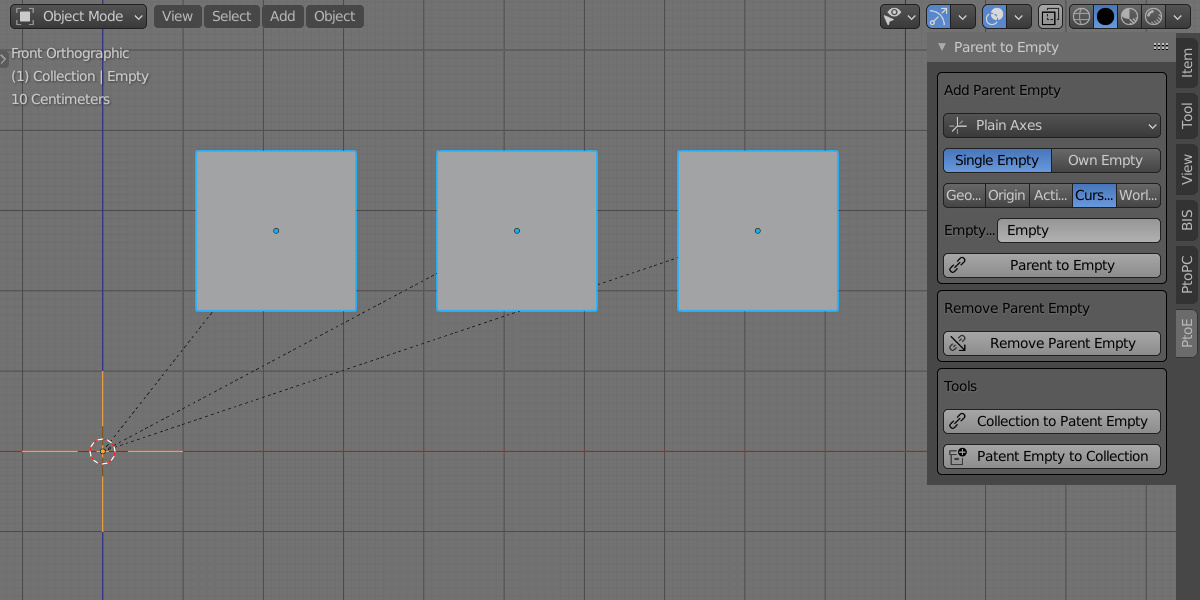
Parent to Empty is a Blender add-on for parenting selected objects to an Empty from the 3D Viewport. It can create one Empty for the selection or a separate Empty for each object. The controls appear in the N panel under the PtoE tab.
Choose how to handle object transforms
You can keep the selected objects’ location, rotation, and scale, or transfer those transforms to the parent Empty. The listing says that when transforms are transferred, the Empty is created at the object’s origin. A Remove parent Empty button removes the parenting and deletes the Empty from the scene.
Convert collections and add tracking
Collection to Parent Empty converts the active collection into objects parented to an Empty. Parent Empty to Collection converts the parent Empty to the collection. The add-on also has a Track to Empty function, which creates an Empty for objects to target and track.
Install it in Blender
Download the add-on archive, then open Blender Preferences and go to Add-ons. Choose Install and select the downloaded ZIP archive. After installing, open the 3D Viewport’s N panel and select the PtoE tab. The Superhive product listing identifies version 1.1.0, developer Nikita Akimov, and the GPL license. AnyPlugins lists the add-on as free.
Check Blender compatibility
The Superhive page’s feature text names Blender 2.93, 3.0, and 3.1. Its details section lists 2.93 and 3.0. The page does not confirm support for newer releases, so check the developer’s listing before installing it in another Blender version.