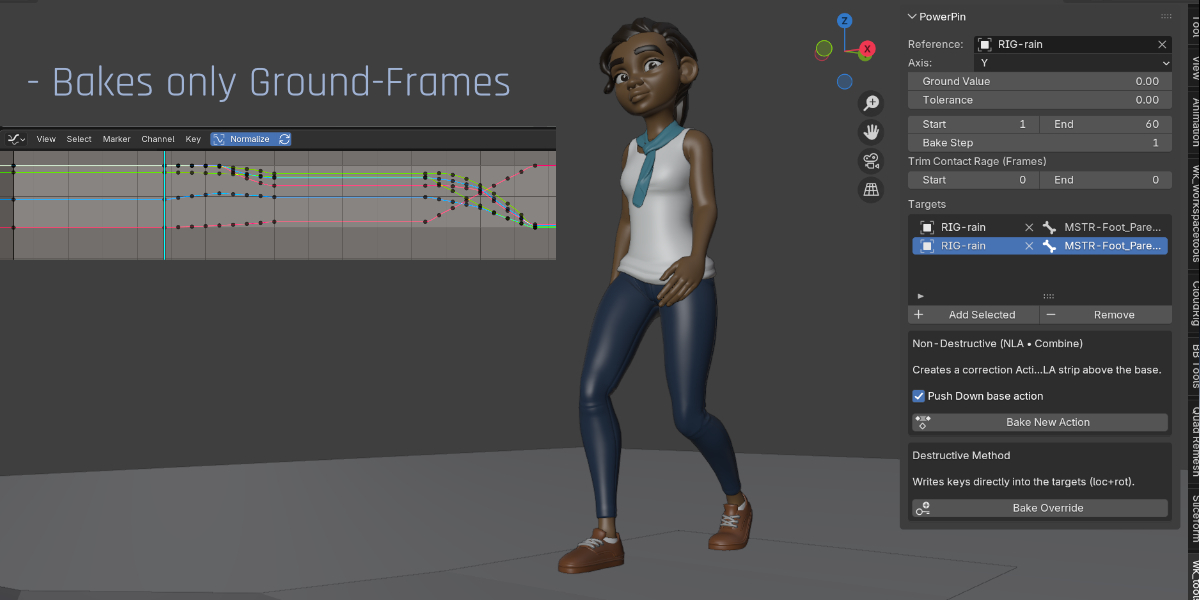
Powerpin is a Blender add-on by Wolfram Kampffmeyer for correcting foot slide in character walk cycles. It detects ground-contact segments and pins selected feet during those segments, including when a character walks around a curve or up a hill. Contact is detected against a chosen reference’s local up axis; the correction keeps the target feet in place in world space while the character moves.
Set up contact detection
Choose a Reference, usually the armature or a control object, and one or more Target feet or bones. Set the local axis and Ground Value; 0.0 is the usual value. Powerpin detects contact when the selected axis is within the chosen Tolerance of that value. The documentation lists 0.001 as the default tolerance and suggests increasing it when the walk cycle’s keys do not sit precisely on a flat curve.
Set the frame range and Bake Step before baking. Bake Step controls key spacing within detected contact segments, while contact detection still scans each frame. If the result pops at a segment boundary, Trim Contact Range can drop frames from the start or end of each segment. Trimming may reduce visible pops, with some sliding possible in the trimmed frames.
Choose how to store the correction
Bake New Action creates a separate correction Action in an NLA strip, leaving the original animation intact. Powerpin pushes the base action into the NLA when needed. You can mute or remove the correction strip to return to the underlying animation, then edit the walk and bake again. Bake Override writes keys directly to the target’s F-curves and changes the original animation.
The add-on also includes Un-Push Action for restoring a selected NLA strip’s Action as the active Action. The documentation says this operation does not bake, resample, or add keyframes.
Blender compatibility and setup
The Powerpin listing identifies it as a Blender Extension-compatible add-on, lists Blender 4.0 through 5.2, and says it was tested with Blender 5.2. It works on its own and integrates into the wk_tools side panel if you already use wk_tools. The developer documentation covers installation and the available controls. The listing identifies the license as GPL.