PowerSave is a free, open-source Blender add-on by bonjorno7, developed with TeamC. Its button saves without a filename dialog using configurable timestamps; when the file already has a save, another PowerSave action creates an incremental save with +1 in the filename. It also provides autosave preferences and a 3D View icon for scene status. Configure a base folder to choose the save location; otherwise, saves go to a temporary location.
Choose where PowerSave saves files
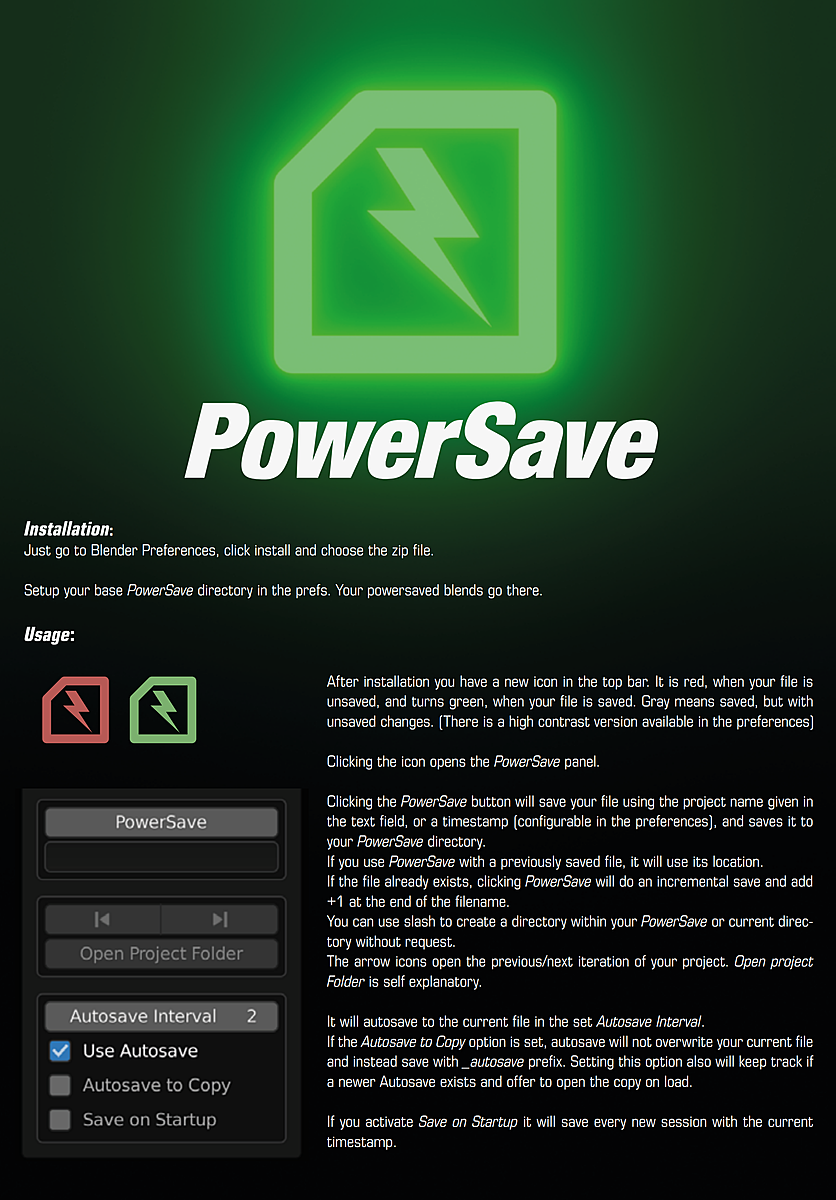
You can set a base PowerSave directory in the add-on preferences. PowerSave also works before you configure one, but those saves go to a temporary location on your computer. Set a folder you can find if you want to keep the saves in a specific place.
Make timestamped and incremental saves
After installation, a toolbar icon opens the PowerSave menu. Press the PowerSave button to save without entering a filename in a dialog. The timestamp format is configurable with Python datetime syntax. When the file already has a save, another PowerSave action creates an incremental save and adds +1 to the end of the filename. A slash in the name can create a directory within the PowerSave or current directory without a prompt.
Read the save status and set autosave
The icon in Blender's 3D View shows the scene's save state: red means it has never been saved, grey means there are unsaved changes, and green means the latest changes are saved. PowerSave also has built-in autosave preferences. You can set an interval, or enable Save on Startup to save each new session with the current timestamp. A high-contrast icon option is available in preferences.
Install and check compatibility
The PowerSave documentation describes installing PowerSave from Blender Preferences by selecting its ZIP file, then setting the base save directory in preferences. Superhive lists compatibility with Blender 2.8 through 5.2 and marks it Blender Extension Compatible. The add-on is GPL-licensed, and its listing notes HardOps integration through the settings menu. Check the listing for current compatibility and setup details before installing. The source code is available on GitHub.